
Personal Profile
The Personal Profile page displays the core information associated with your BrokerIG account, including your User ID, Username, Email, Phone, role, Two-Factor Auth status, and Account Status.
Review this page before depositing, withdrawing, or contacting Customer Support because some of these details may be required to identify your account.
Open your Personal Profile
Section titled “Open your Personal Profile”- Sign in to your account.
- Open Settings.
- Select Profile.
- Review the Account Information section.
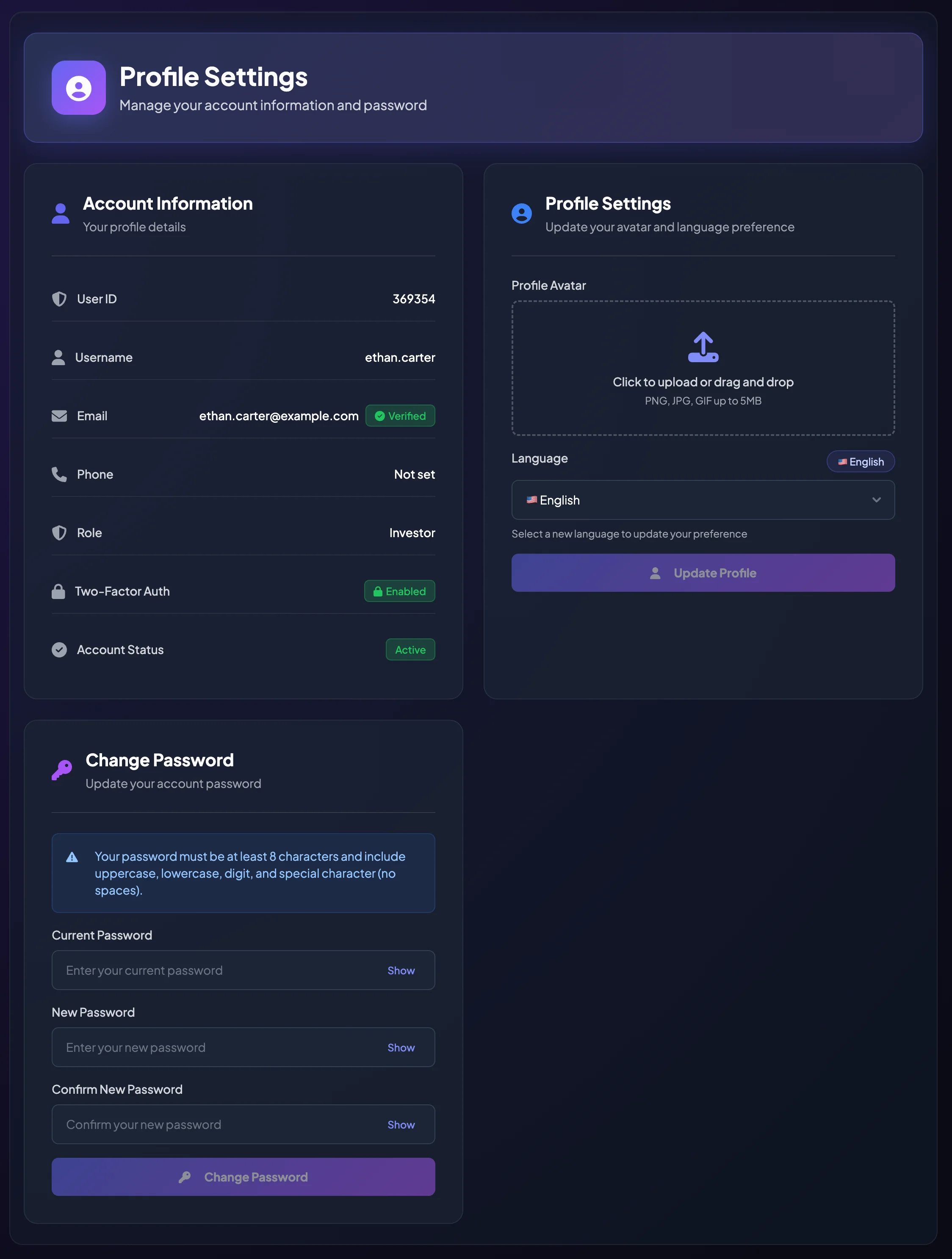
Important account information
Section titled “Important account information”| Information | Meaning |
|---|---|
| User ID | The internal identifier for your account. Customer Support may request it when investigating an issue. |
| Username | The name used to identify your account in the system. |
| The email address linked to your account. It may be used for OTP verification and notifications. | |
| Phone | The phone number associated with your account, if one has been provided. |
| Role | Shows whether the account is an Investor, Consultant, Agency, or another assigned role. |
| Two-Factor Auth | Shows whether 2FA is Enabled or Disabled. |
| Account Status | Shows whether the account is active or subject to a restriction. |
Account roles
Section titled “Account roles”Your role determines which features you can access.
| Role | Meaning |
|---|---|
| Investor | A standard user who can deposit, withdraw, use Direct Investment, join campaigns, and use an invitation code. |
| Consultant | An approved user who can create Entrusted Investment campaigns. |
| Agency | An approved person or organization that develops a member network. |
A newly registered account normally starts as a standard Investor. To become a Consultant or Agency, submit the relevant application and wait for approval.
Two-Factor Auth status
Section titled “Two-Factor Auth status”The Two-Factor Auth field shows whether your account is protected by an Authenticator App.
If it shows Disabled, enable 2FA before maintaining a significant balance or submitting withdrawals.
If it shows Enabled, BrokerIG may request an Authentication Code when you sign in or complete certain sensitive actions.
When should you provide your User ID to Customer Support?
Section titled “When should you provide your User ID to Customer Support?”Customer Support may ask for your User ID when:
- A deposit has not been credited.
- A withdrawal is delayed or failed.
- A referred member is missing from your Network Tree.
- You cannot sign in.
- You lost your 2FA device or Recovery Codes.
- Your Account Status needs to be reviewed.
Never send your password, OTP, Authentication Code, or Recovery Codes to Customer Support.
- If account information is incorrect, contact Customer Support for guidance.
- Some features may be unavailable when the account is not active.