
Balance History
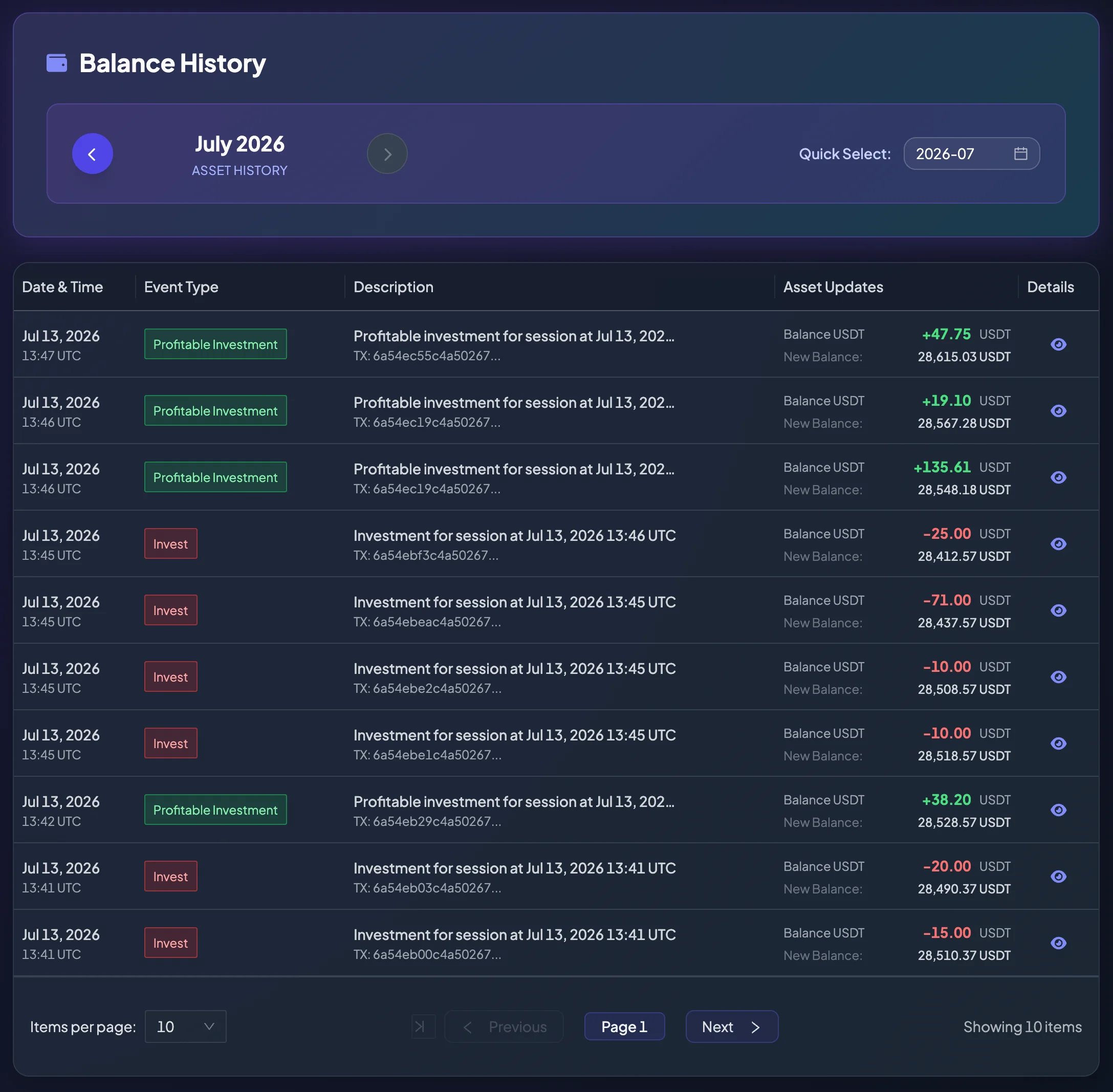
The Balance History page records every event that increases or decreases the USDT balance in your account. Unlike Deposit and Withdrawal History, this page does not only show wallet deposits and withdrawals; it also includes changes from direct investments, entrusted investment campaigns, commissions, referrals, and rewards.
You can treat this page as your account ledger. Each row explains why the balance changed, how much was credited or deducted, and the New Balance after the event was recorded.
When should you check Balance History?
Section titled “When should you check Balance History?”Open this page when:
- Your balance increased or decreased and you do not know why.
- You want to confirm that funds were credited after a successful deposit.
- You want to confirm that funds were deducted after a withdrawal or investment.
- You want to reconcile a profitable direct investment.
- You want to track funds related to an entrusted investment campaign.
- You want to check a commission, referral reward, or system reward.
How to read a balance-history row
Section titled “How to read a balance-history row”Each row commonly contains:
| Information | Meaning |
|---|---|
| Date & Time | When the event was recorded, normally in UTC. |
| Event Type | The reason for the balance change, such as Deposit, Withdrawal, Invest, or Profitable Investment. |
| Description | A short explanation that may include an investment session time or transaction information. |
| Asset Updates | The USDT amount credited or deducted. |
| New Balance | Your USDT balance after the event was applied. |
| Tx/ID | A transaction hash or reference ID for reconciliation. |
| Details | Opens a modal or drawer with additional information. |
How to interpret plus and minus signs
Section titled “How to interpret plus and minus signs”| Sign | Meaning |
|---|---|
+ | The balance increased. Examples: successful deposit, Profitable Investment, refund, commission, or reward. |
- | The balance decreased. Examples: withdrawal, Invest, or Campaign Joined. |
For example, +18.10 USDT means 18.10 USDT was credited. -10.00 USDT means 10.00 USDT was deducted.
What is New Balance?
Section titled “What is New Balance?”New Balance is the account balance after the event on that row is applied.
Example:
- Before the event, the balance is 100 USDT.
- You place a 10 USDT investment.
- Balance History records
-10 USDT. - New Balance is 90 USDT.
When several transactions occur close together, read the rows in time order to understand the sequence of credits and deductions.
Common event groups
Section titled “Common event groups”Balance History may include many event types. They can be grouped as follows:
| Group | Examples |
|---|---|
| Deposit, withdrawal, and transfer | Deposit, Withdrawal, Internal Transfer, Withdrawal Failed - Refunded. |
| Direct investment | Invest, Profitable Investment, Invest Failed - Refunded. |
| Entrusted investment / campaigns | Campaign Created, Campaign Joined, Campaign Settlement, Consultant Campaign Settlement, Consultant Campaign Commission, Agency Campaign Commission. |
| Referral | Referral Commission Reward. |
| Reward | Pending Reward, Withdrawal Pending Reward, Weekly System Reward. |
See the complete table in Balance Change Types.
Reconcile a direct investment
Section titled “Reconcile a direct investment”When you place a direct investment, Balance History may show:
- An Invest row with a negative amount representing the USDT used to place the investment.
- If the result is profitable, a Profitable Investment row with a positive amount.
- If a session fails and the amount is refunded according to system rules, an Invest Failed - Refunded row.
To review each investment in detail, open Investment History.
Reconcile an entrusted investment
Section titled “Reconcile an entrusted investment”When you join an entrusted investment campaign, Balance History may record campaign events such as:
- Campaign Joined: funds are recorded when you allocate capital to the campaign.
- Campaign Settlement: the balance is updated when the campaign settles the participant result.
- Consultant Campaign Settlement or Consultant Campaign Commission: applies to accounts with the Consultant role.
- Agency Campaign Commission: applies when an account is eligible for the agency share.
For a regular participant, the most relevant events are Campaign Joined and Campaign Settlement.
Learn more:
Filters and pagination
Section titled “Filters and pagination”The history may contain many rows, so the page uses filters and pagination. You may be able to:
- Select Items per page.
- Move to the previous or next page.
- Use a date or period filter.
- Search the Description field.
- Filter by Event Type.
- Open Details for a row.
- Export filtered data when the feature is available.
When looking for a specific transaction, select a date range close to when it occurred.
When your balance does not match expectations
Section titled “When your balance does not match expectations”Check the following in order:
- Open Balance History.
- Find rows near the time the balance changed.
- Review the Event Type and credit or deduction.
- Check the New Balance after each row.
- Compare with Deposit and Withdrawal History, Investment History, or My Campaigns.
- If the cause remains unclear, save the Tx/ID and contact Support.
Information to send to Support
Section titled “Information to send to Support”For a balance-history issue, provide:
- Account email or user ID.
- Event time.
- Event Type shown in the table.
- Amount credited or deducted.
- New Balance after the event.
- Tx/ID shown on the row.
- Screenshot of the relevant history row.
Contact Support through SUPPORT_EMAIL or SUPPORT_TELEGRAM_URL.