
Register with an Invitation Code
BrokerIG requires new users to register with an Invitation Code. Depending on the context, this may also be described as a referral code or invite code.
When an account is created with an Invitation Code, the system records the person who invited you and links your account to the corresponding referral branch.
What is the Invitation Code used for?
Section titled “What is the Invitation Code used for?”The Invitation Code helps the system:
- Record the person who invited you.
- Link your account to the correct referral branch.
- Calculate commissions or revenue sharing when the applicable policy allows it.
- Help the referrer manage F1 members and the wider network.
- Ensure that your account is created under the intended branch.
An incorrect code may link your account to the wrong branch. Check the code carefully before continuing.
Ways to receive an Invitation Code
Section titled “Ways to receive an Invitation Code”| Method | Description |
|---|---|
| Referral link | The Invitation Code is included in the registration URL. |
| Manual code | Your referrer sends the code for you to enter in the form. |
| Community QR code or link | A link opened from an official community, referral page, or Agency. |
If the registration form does not automatically display the code from a referral link, ask your referrer to resend the code or verify the link.
Registration steps
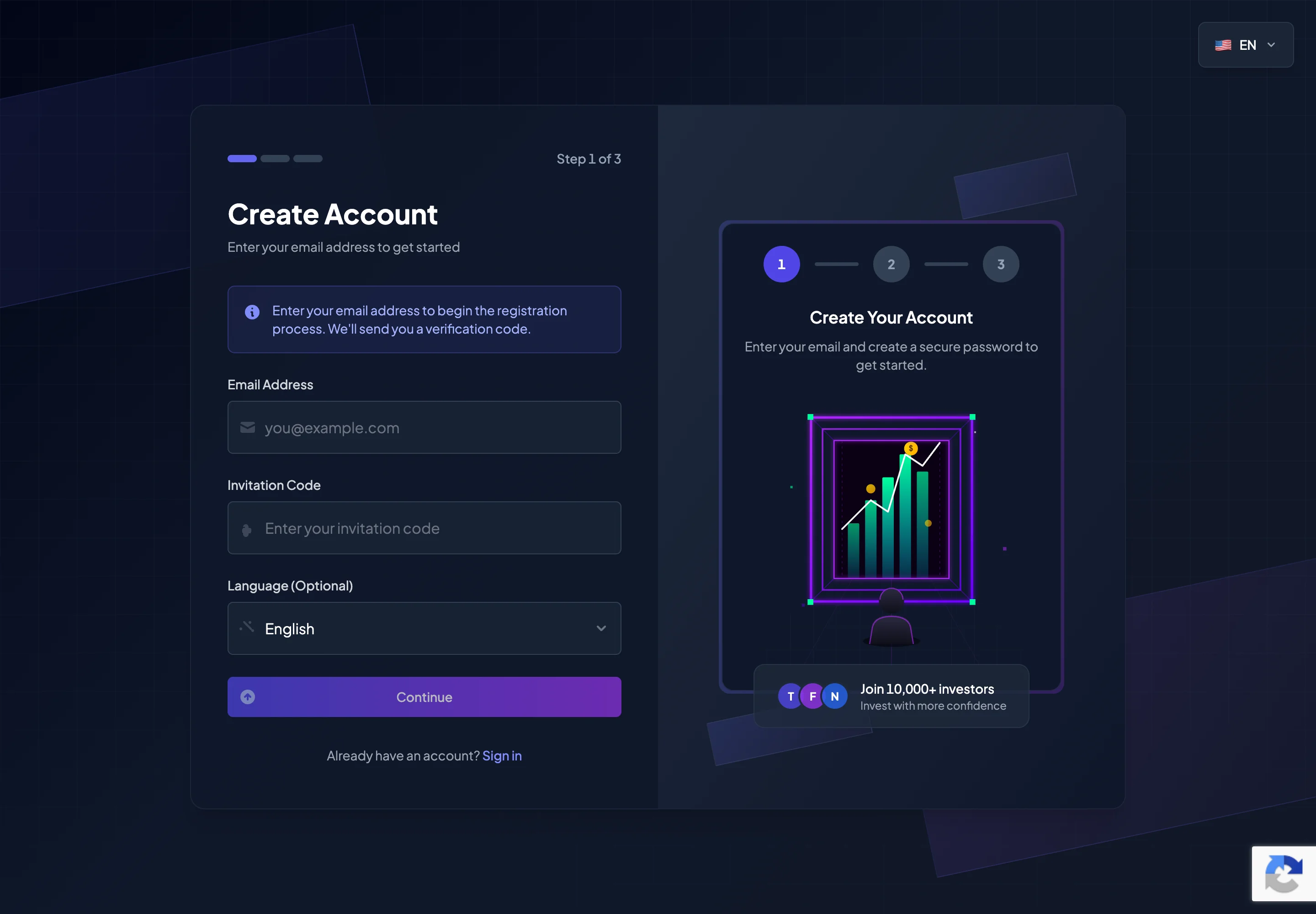
Section titled “Registration steps”- Open the registration page from a referral link or visit
__PLATFORM_WEBSITE__. - Confirm that you are on the official website.
- Enter your Email Address.
- Enter the Invitation Code if it was not filled in automatically.
- Select a language if the Language (Optional) field is available.
- Select Continue.
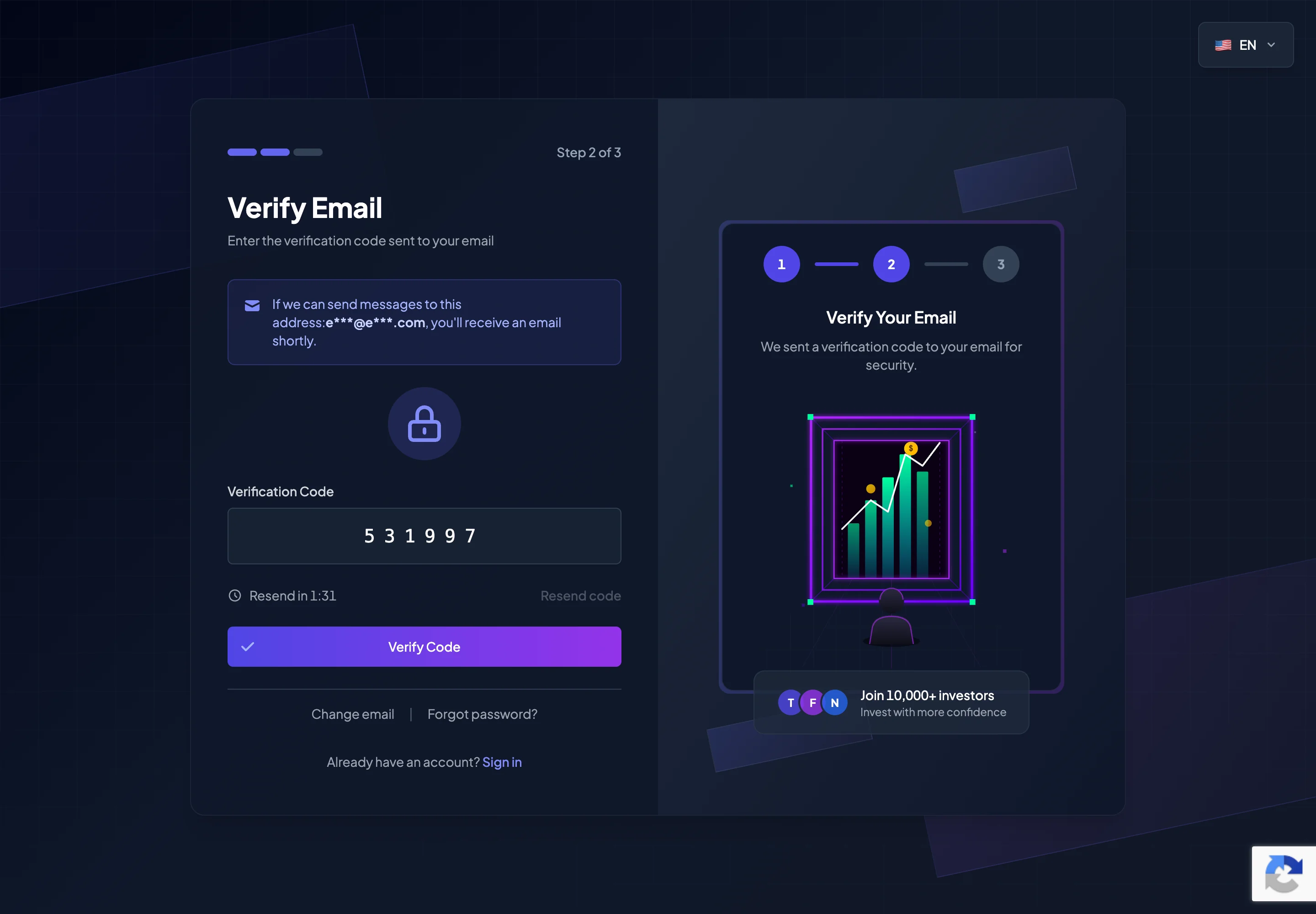
- Enter the Verification Code sent to your email.
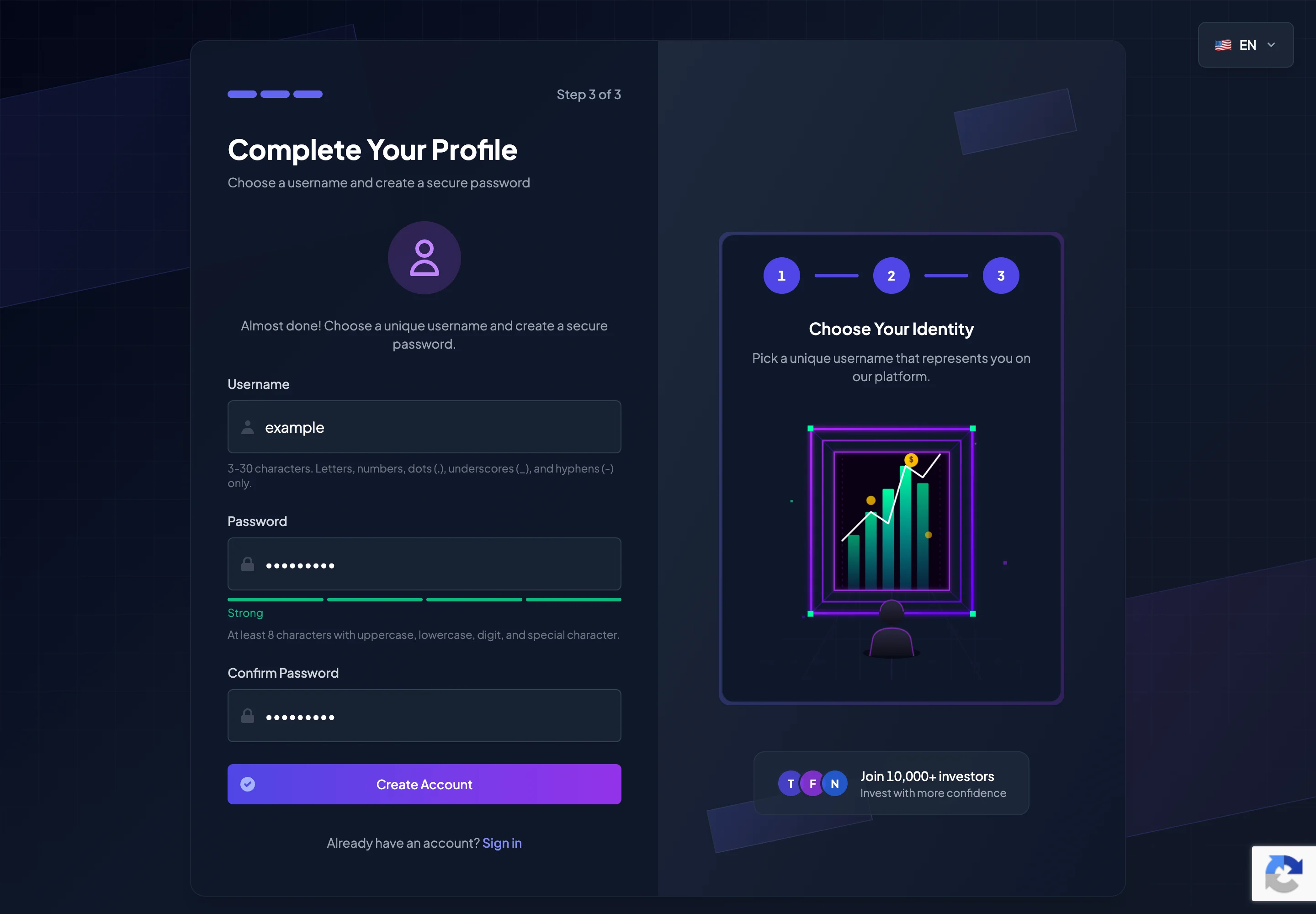
- Choose a unique Username.
- Create and confirm a secure Password.
- Select Create Account.
- After registration is successful, select Go to Login and sign in.
Information used during registration
Section titled “Information used during registration”| Field | Required | Notes |
|---|---|---|
| Email Address | Yes | Use an email account you can access. |
| Invitation Code | Yes | The code must be valid and may need to be numeric. |
| Language | Optional | Available languages depend on the platform configuration. |
| Verification Code | Yes when requested | A 6-digit code sent to your email. |
| Username | Yes | Must be unique and follow the format shown in the form. |
| Password | Yes | Must meet the displayed password requirements. |
| Confirm Password | Yes | Must match the Password field. |
Verify your email
Section titled “Verify your email”After the first registration step, BrokerIG sends a Verification Code to your email address.
When entering the code:
- Confirm that the displayed email address is correct.
- Never share the code with anyone.
- Enter it before it expires.
- Check Spam or Junk if the message does not appear in your inbox.
- Use Resend code if the timer allows it and the message still has not arrived.
The Verification Code is only used to confirm the registration action. Customer Support does not need this code.
Choose a username and secure password
Section titled “Choose a username and secure password”The UI requires a unique username and a secure password.
A username may need to meet requirements such as:
- Between 3 and 30 characters.
- Letters, numbers, dots (
.), underscores (_), and hyphens (-) only. - Not already used by another account.
Your password should:
- Contain at least 8 characters.
- Include an uppercase letter.
- Include a lowercase letter.
- Include a number.
- Include a special character.
- Contain no spaces.
- Be different from your email address and username.
- Not be reused from another website.
A good principle is:
Make it long, difficult to guess, and unique to BrokerIG.
Avoid:
- Dates of birth.
- Phone numbers.
- Personal names.
12345678password- Passwords already used for an exchange, wallet, or email account.
If the Invitation Code is invalid
Section titled “If the Invitation Code is invalid”If the system reports that the Invitation Code is invalid or no longer available:
- Check for missing characters.
- Remove any accidental spaces.
- Confirm that the code follows the required numeric format, if shown.
- Ask your referrer to send the code again.
- Reopen the referral link in a new browser tab.
- If the issue continues, contact Customer Support and include a screenshot of the error.
Do not guess an Invitation Code.
If the account is linked to the wrong referrer
Section titled “If the account is linked to the wrong referrer”If you believe your account was linked to the wrong referral branch:
- Do not create multiple accounts to test different codes.
- Record the account email address.
- Record the Invitation Code you used.
- Save a screenshot if available.
- Contact Customer Support as soon as possible.
Changing the referral branch after registration may be restricted by platform policy.
What should you do after registration?
Section titled “What should you do after registration?”After the account has been created:
- Sign in.
- Review your profile.
- Enable 2FA.
- Save your Recovery Codes.
- Link the Telegram bot.
- Install the app if you use BrokerIG on a phone.
- Read the Finance guides before depositing USDT.
- Try Demo Mode before using Real Mode.
Security notes
Section titled “Security notes”- Register only on the official website.
- Do not open registration links from unknown sources.
- Never send your password or Verification Code to your referrer.
- A referrer only needs their Invitation Code to be entered correctly; they do not need access to your account.
- If you suspect a phishing link, do not enter any information and contact an official support channel.