
Create an Investment Campaign
The Create Campaign page is available only to accounts approved for the Consultant role. Consultants use this wizard to define the campaign information, required investment, expected return, commission structure, and schedule before publishing the campaign to users.
The wizard contains five steps:
- Basic Information
- Investment Parameters
- Commission Structure
- Schedule & Duration
- Review & Create
Open the Create Campaign wizard
Section titled “Open the Create Campaign wizard”- Sign in with an account that has the Consultant role.
- Open Entrusted Investment.
- Go to the Consultant’s My Campaigns management page.
- Select Create Campaign.
- The Create New Campaign modal opens.
- Complete all five steps, then select Create Campaign in the final step.
Use Previous and Next Step to move through the wizard. The interface may also allow you to reopen a completed step from the progress bar.
Step 1: Basic Information
Section titled “Step 1: Basic Information”The Basic Information step defines how the campaign is presented to users.
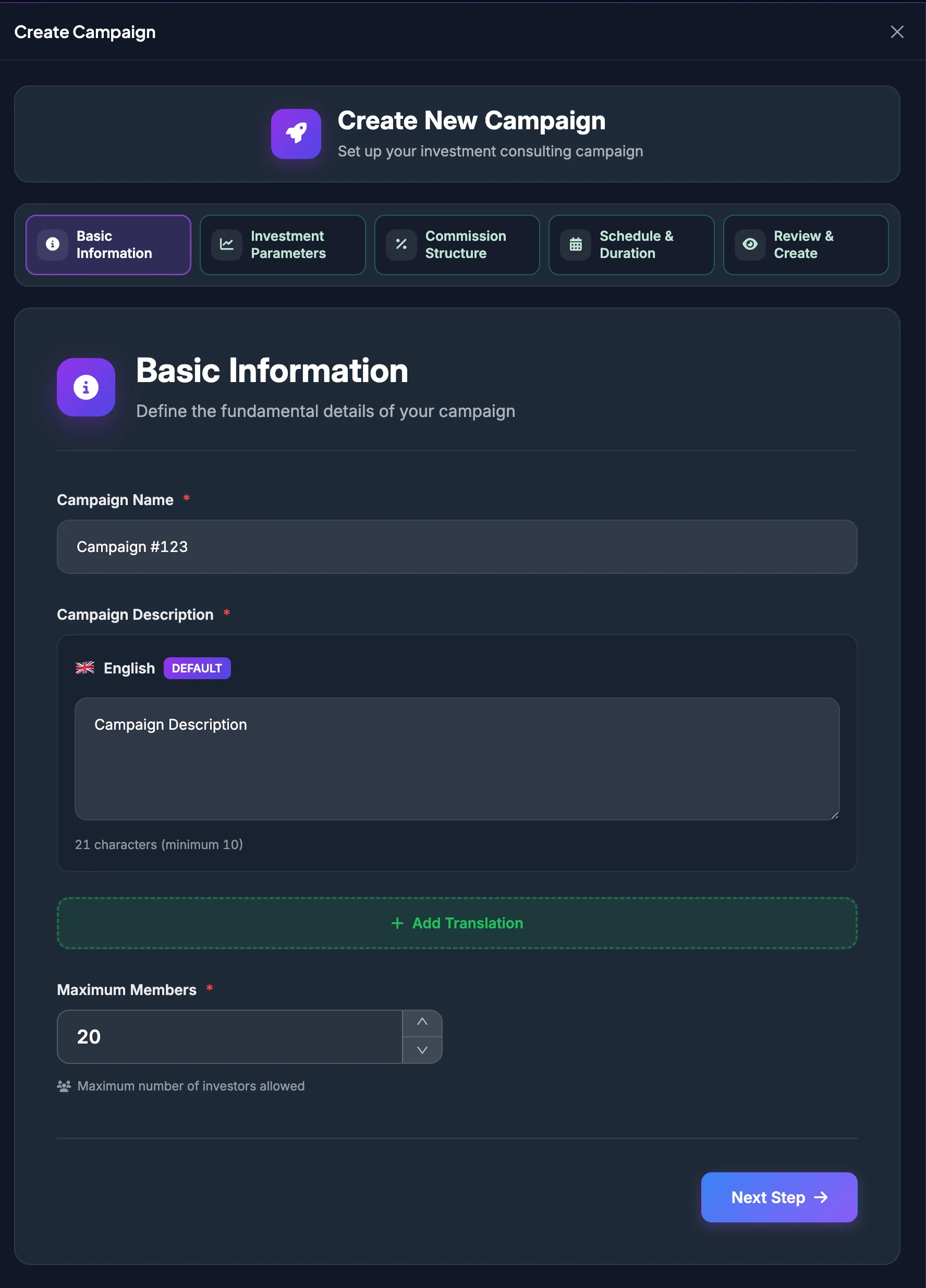
Campaign Name
Section titled “Campaign Name”Enter a short and recognizable campaign name.
The name should:
- Reflect the campaign objective or style.
- Avoid unsupported profit guarantees.
- Avoid impersonating another brand, organization, or Consultant.
- Avoid misleading wording.
Campaign Description
Section titled “Campaign Description”Explain:
- The investment strategy.
- Campaign goals.
- Intended participants.
- Risk level.
- What investors can expect.
- Important limitations or conditions.
Each required description must contain at least 10 characters.
The form supports multiple languages:
- Enter the description in the default language.
- Select Add Translation.
- Select another language.
- Enter the corresponding description.
- Remove an additional language when it is not required.
Review machine-translated content before publishing, especially text related to returns, commissions, and risk.
Maximum Members
Section titled “Maximum Members”Enter the maximum number of investors allowed to join.
This value determines the Maximum Total Pool:
Maximum Total Pool = Required Investment Amount × Maximum Members
Once Member Capacity is reached, new users may no longer be able to join.
Currency Type
Section titled “Currency Type”Select the currency used for campaign transactions. Confirm that the selected asset is currently supported by the platform.
Step 2: Investment Parameters
Section titled “Step 2: Investment Parameters”The Investment Parameters step defines the minimum capital per member and the Expected Return Rate.
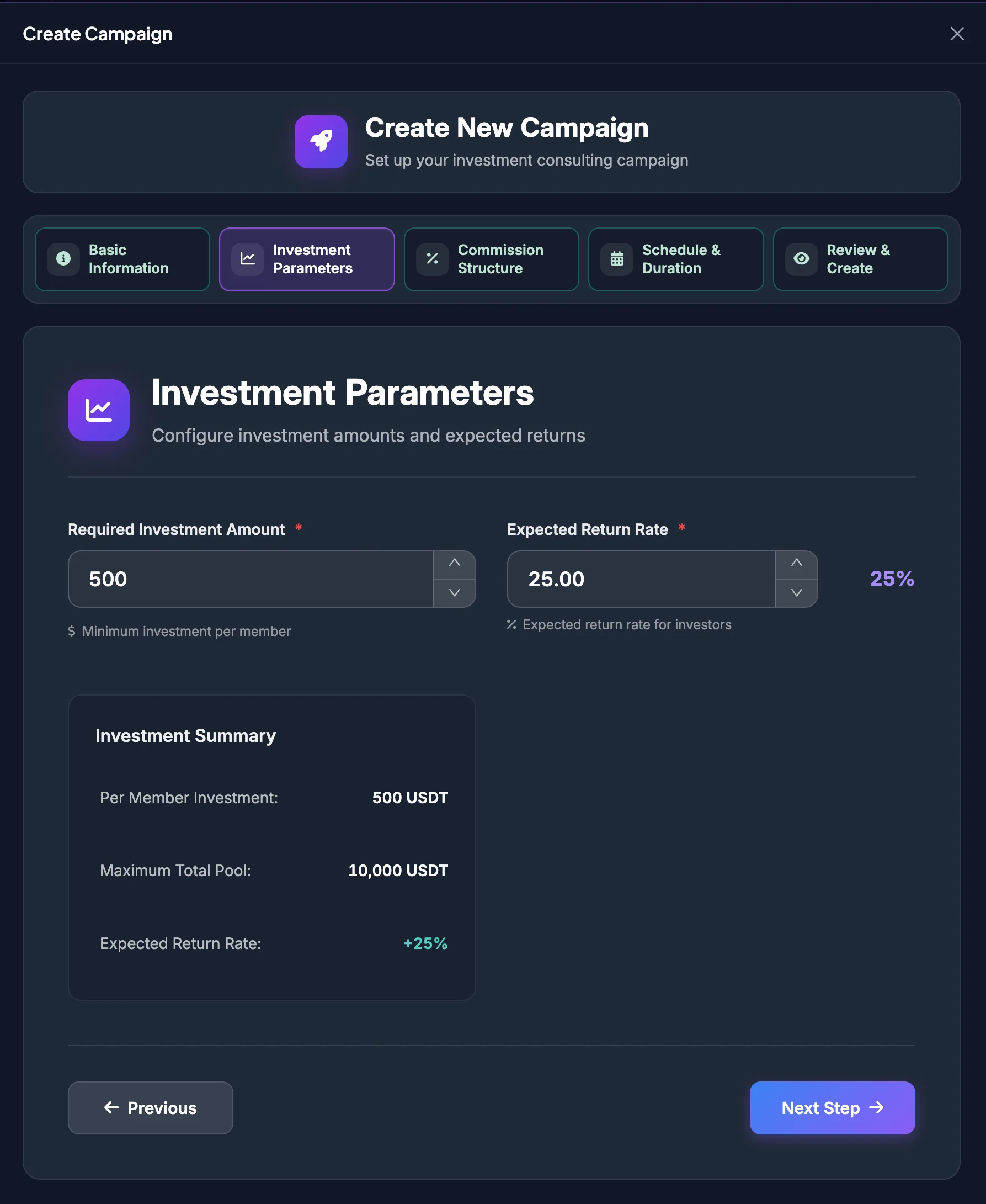
Required Investment Amount
Section titled “Required Investment Amount”Required Investment Amount is the minimum amount each member must allocate to join the campaign.
Example:
- Required Investment Amount: 1,000 USDT.
- Maximum Members: 50.
- Maximum Total Pool: 50,000 USDT.
Set an amount appropriate for the strategy, target users, and the campaign’s management capacity.
Expected Return Rate
Section titled “Expected Return Rate”Expected Return Rate is used to calculate the projected benefit for investors.
After the campaign is created, this value may appear as the Committed Return Rate, Commitment, or expected return on campaign screens.
Investment Summary
Section titled “Investment Summary”The Investment Summary automatically displays:
| Metric | Meaning |
|---|---|
| Per Member Investment | Required Investment Amount for one member. |
| Maximum Total Pool | Required Investment Amount multiplied by Maximum Members. |
| Expected Return Rate | The expected-return percentage entered in the form. |
Review these values before selecting Next Step.
Step 3: Commission Structure
Section titled “Step 3: Commission Structure”The Commission Structure step defines the Consultant’s share of campaign profit and the portion shared with eligible Agency Partners.
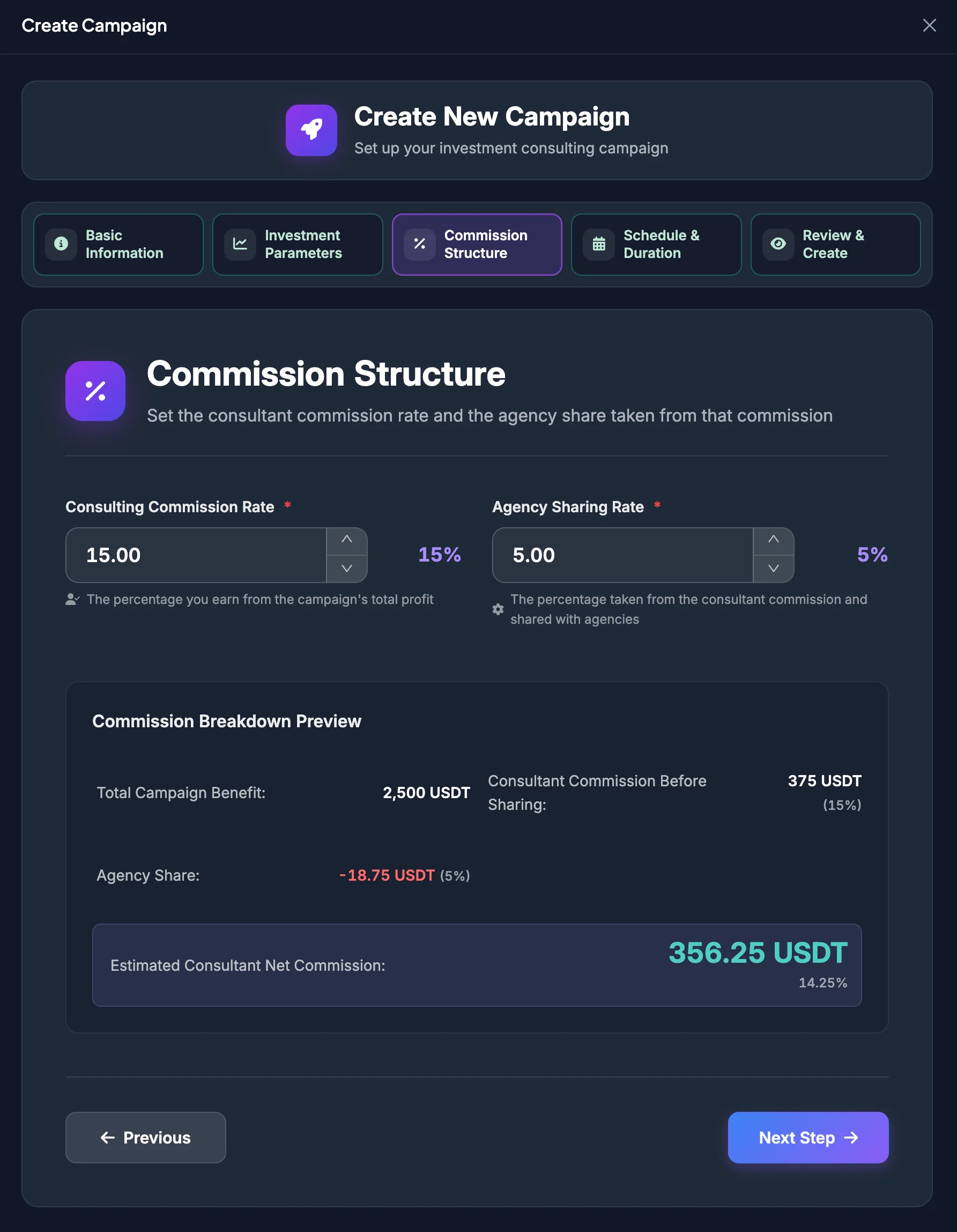
Consulting Commission Rate
Section titled “Consulting Commission Rate”Consulting Commission Rate is the percentage the Consultant earns from the campaign’s total profit.
Example:
Total Campaign Benefit: 12,500 USDT
Consulting Commission Rate: 15%
Consultant Commission Before Sharing = 12,500 × 15% = 1,875 USDT
Agency Sharing Rate
Section titled “Agency Sharing Rate”Agency Sharing Rate is the percentage taken from the Consultant Commission and shared with eligible agencies.
It is not deducted directly from the campaign capital or from the participant’s entire profit.
Example:
Consultant Commission Before Sharing: 1,875 USDT
Agency Sharing Rate: 20%
Agency Share = 1,875 × 20% = 375 USDT
Estimated Consultant Net Commission = 1,875 − 375 = 1,500 USDT
Commission Breakdown Preview
Section titled “Commission Breakdown Preview”The preview may display:
| Metric | Reference calculation |
|---|---|
| Total Campaign Benefit | Total pool × Expected Return Rate |
| Consultant Commission Before Sharing | Total benefit × Consulting Commission Rate |
| Agency Share | Gross Consultant commission × Agency Sharing Rate |
| Estimated Consultant Net Commission | Gross commission − Agency Share |
These are estimates based on the entered parameters. Actual values depend on participating members, actual capital, and campaign performance.
Both percentage values must remain between 0% and 100%.
Step 4: Schedule & Duration
Section titled “Step 4: Schedule & Duration”The Schedule & Duration step defines when the campaign begins, how long it runs, and when it ends.
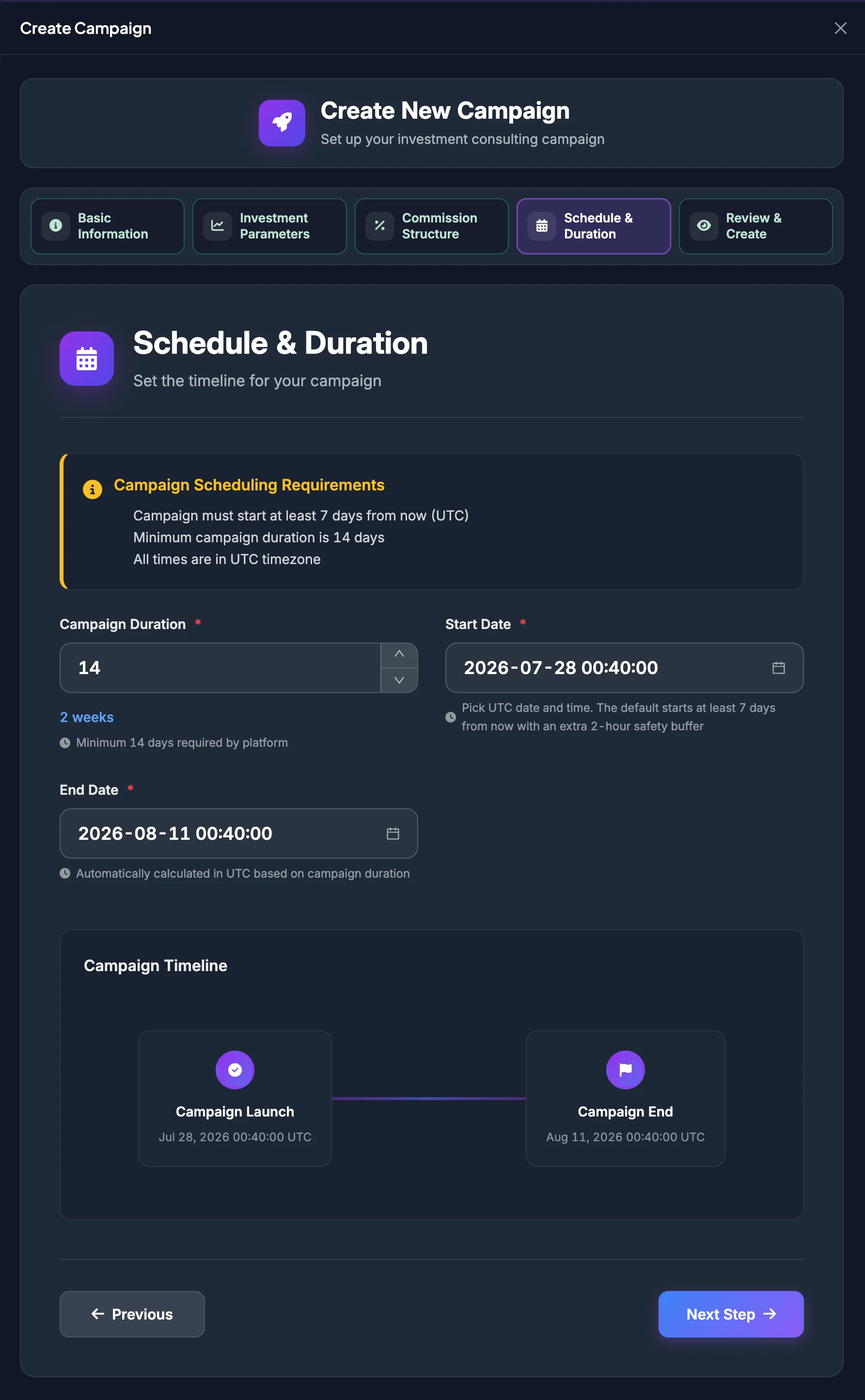
Campaign Scheduling Requirements
Section titled “Campaign Scheduling Requirements”The wizard applies these conditions:
- The campaign must start at least 7 days from the current time.
- The minimum campaign duration is 14 days.
- All times use the UTC timezone.
- The default start time may include an additional two-hour safety buffer to avoid failing the minimum-start validation during submission.
Campaign Duration
Section titled “Campaign Duration”Enter the number of days the campaign will run. The platform requires at least 14 days.
Choose a duration based on:
- The actual strategy.
- Capital-management requirements.
- Expected volatility.
- The period during which you can actively manage and remain responsible for the campaign.
Start Date
Section titled “Start Date”Select the start date and time in UTC.
When the selected time is too close, the interface displays:
Campaign must start at least 7 days from now (UTC).
End Date
Section titled “End Date”The End Date is calculated automatically in UTC from the Start Date and Campaign Duration.
Review it before continuing. To change the End Date, adjust the duration or Start Date.
Campaign Timeline
Section titled “Campaign Timeline”The Campaign Timeline displays:
- Campaign Launch
- Campaign End
Use this preview to verify the campaign period before moving to the final step.
Step 5: Review & Create
Section titled “Step 5: Review & Create”The Review & Create step summarizes all campaign data.
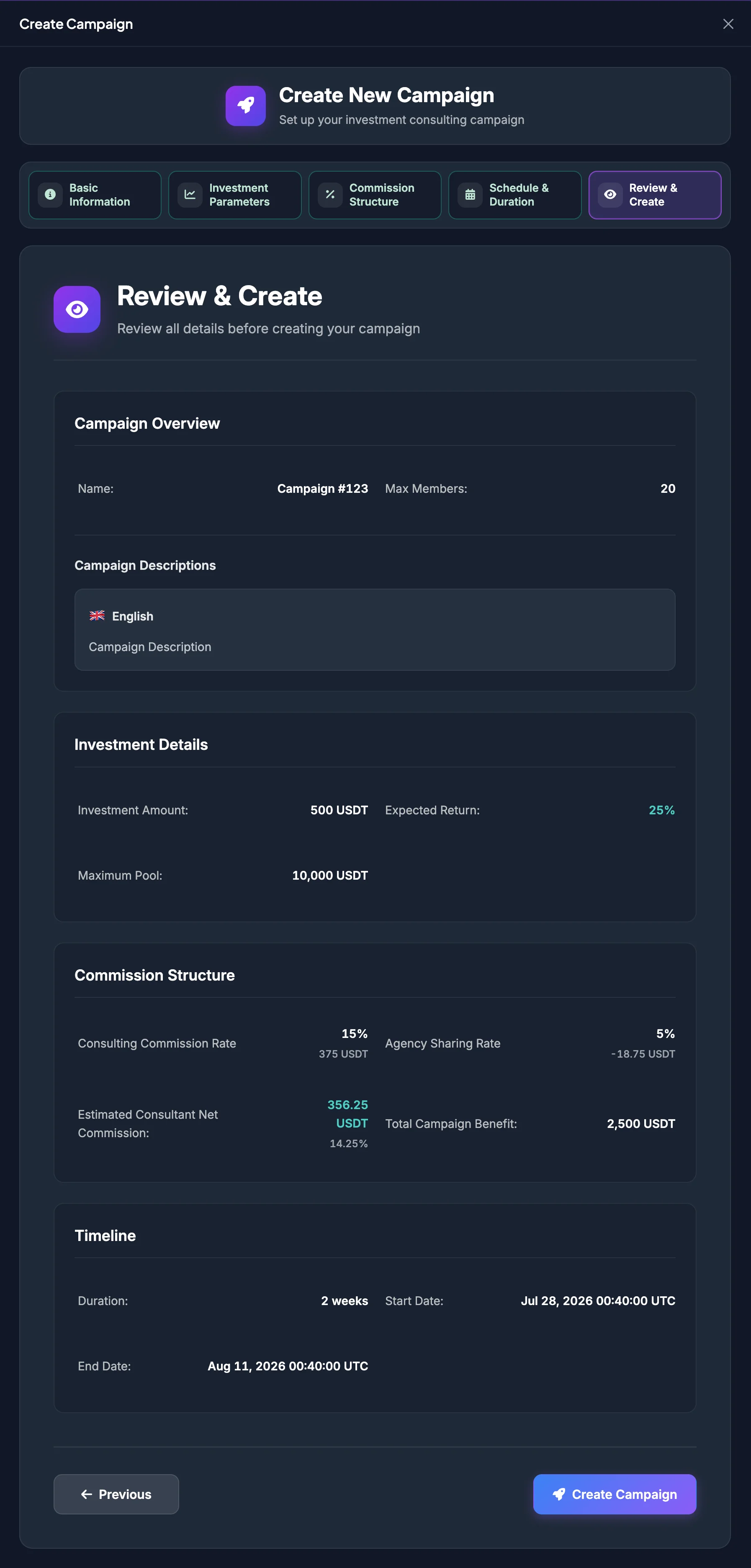
Campaign Overview
Section titled “Campaign Overview”Review:
- Campaign Name.
- Maximum Members.
- Currency Type.
- Risk Level.
- Campaign Image, when provided.
Campaign Descriptions
Section titled “Campaign Descriptions”Review every language and confirm that:
- No required content is missing.
- Translations have the same meaning.
- No wording creates a misleading guarantee.
- Return, commission, and risk information is consistent.
Investment Details
Section titled “Investment Details”Review:
- Required Investment Amount.
- Expected Return Rate.
- Maximum Total Pool.
Commission Structure
Section titled “Commission Structure”Review:
- Consulting Commission Rate.
- Agency Sharing Rate.
- Consultant Commission Before Sharing.
- Agency Share.
- Estimated Consultant Net Commission.
Timeline
Section titled “Timeline”Review:
- Campaign Duration.
- Start Date.
- End Date.
- UTC timezone.
Create the campaign
Section titled “Create the campaign”When all information is correct:
- Select Create Campaign.
- Wait while Creating Campaign… is displayed.
- After success, the interface displays Campaign created successfully.
- The campaign list is refreshed.
- Open the new campaign and verify its displayed information.
Common errors
Section titled “Common errors”| Message or situation | Resolution |
|---|---|
| Description is invalid | Add at least 10 characters for the required language. |
| Required campaign fields are invalid | Return to the marked step and correct the affected fields. |
| Start Date is too early | Select a time at least seven days from now in UTC. |
| Duration is too short | Use a duration of at least 14 days. |
| Percentage value is invalid | Keep the Consultant Commission and Agency Sharing values between 0% and 100%. |
| Campaign could not be created | Keep the entered data, check the connection, and try again. Contact Support if the error continues. |
| Create Campaign is missing | Check the Consultant role and approval status. |