
My Investment Campaigns
The My Investment Campaigns page helps you manage Entrusted Investment campaigns you have joined as a member. Use it to monitor allocated capital, Current Profit/Loss, campaign status, and historical results after campaigns close.
This page does not display Direct Investment records. To review investments you placed yourself, open Investment History under Direct Investment.
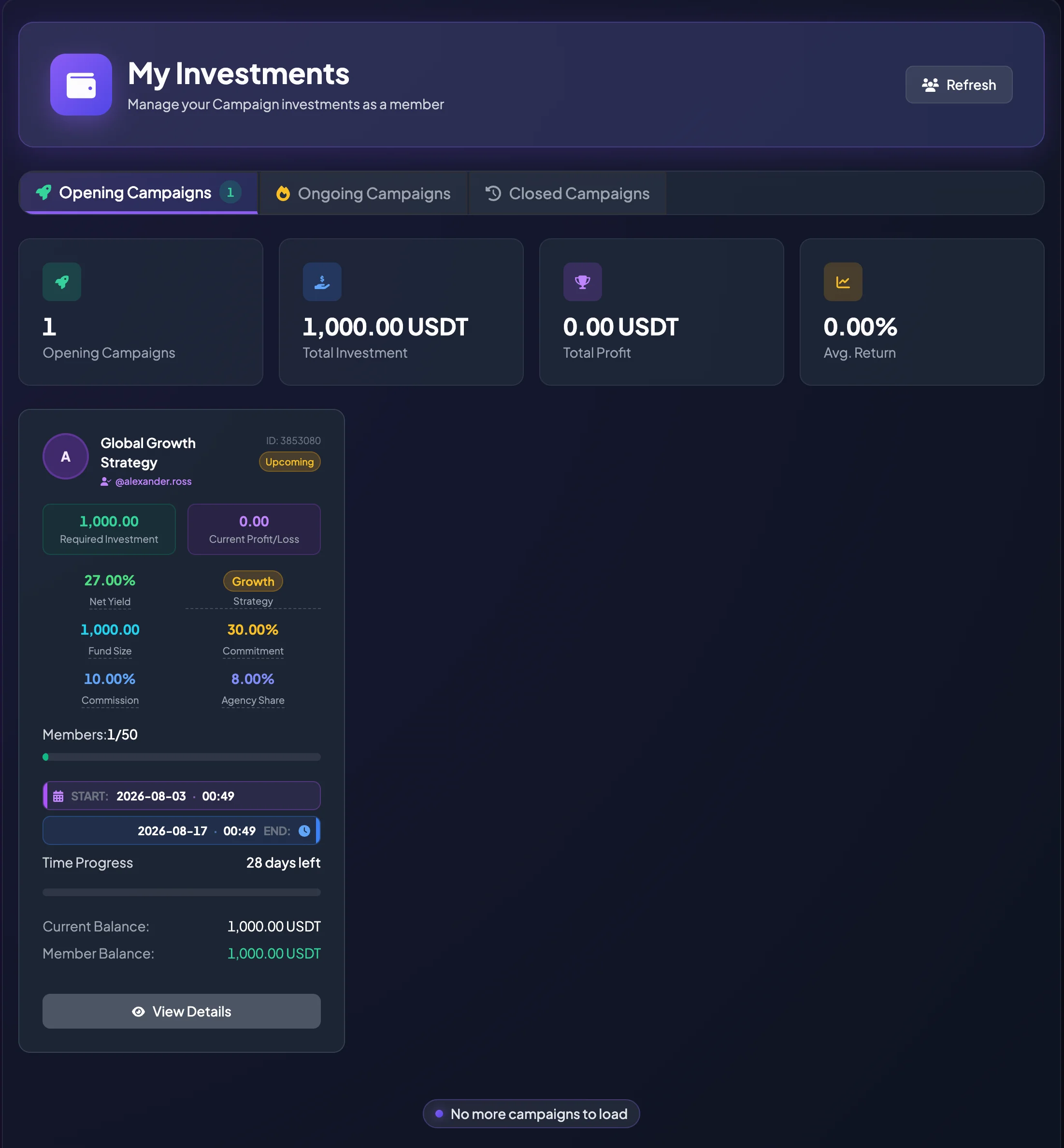
Tabs in My Investment Campaigns
Section titled “Tabs in My Investment Campaigns”Joined - Opening
Section titled “Joined - Opening”Joined - Opening displays campaigns you have joined that are still Opening or Upcoming.
During this period, review:
- Start Time.
- Required Investment.
- Projected Net Yield.
- Consultant.
- Current Members.
Joined - Ongoing
Section titled “Joined - Ongoing”Joined - Ongoing displays joined campaigns that have started.
Use this tab to monitor:
- Current Profit/Loss.
- Timeline Status.
- End Time.
- Current Balance or Member Balance when displayed.
Do not treat the temporary result as the final outcome while the campaign is still running.
History (Closed)
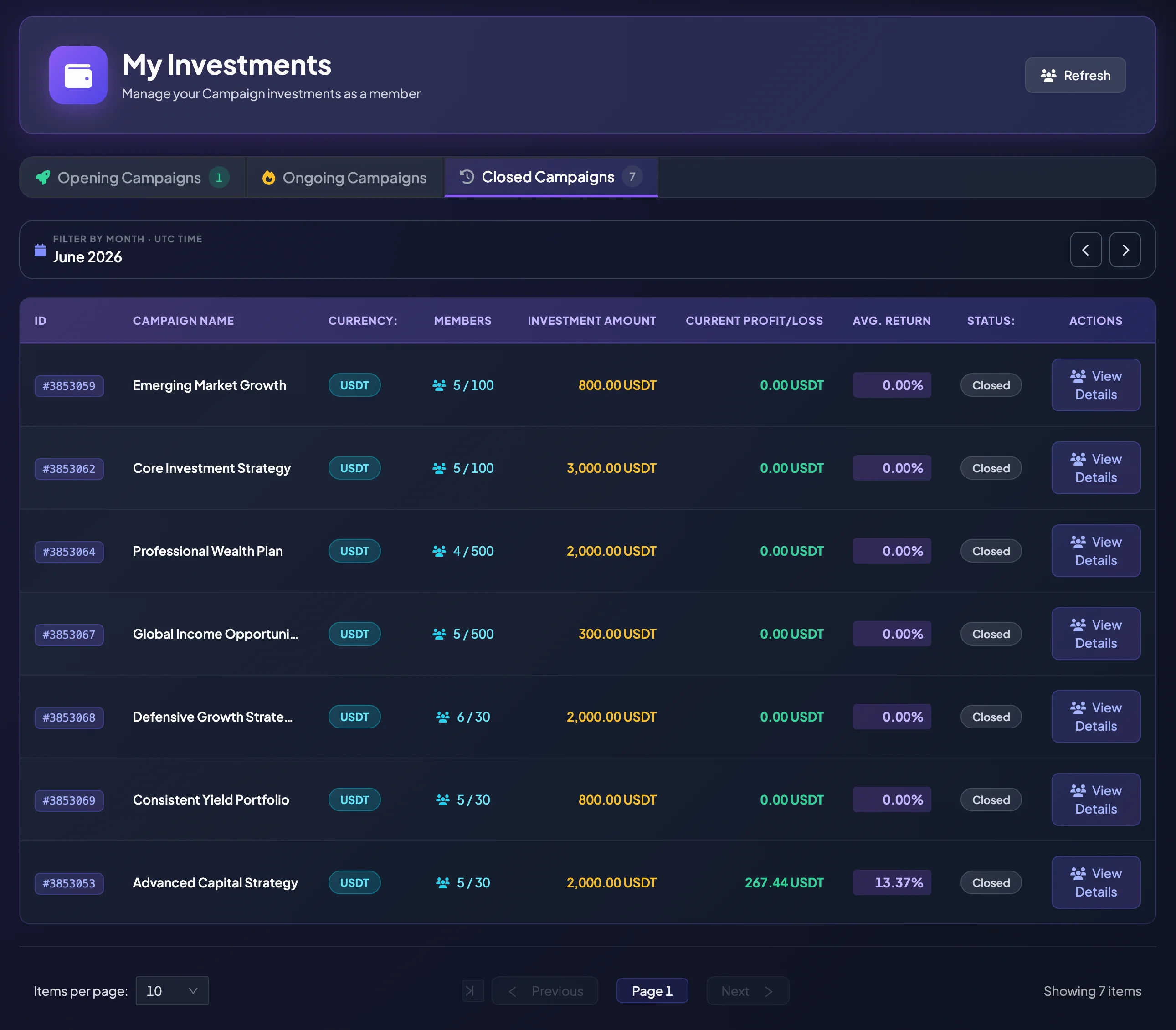
Section titled “History (Closed)”History (Closed) displays Entrusted Investment campaigns you joined that have ended.
This area is normally presented as a table or history list so that you can reconcile completed campaign results.
Summary cards
Section titled “Summary cards”Depending on the selected tab, the page may display summary metrics.
Total Investment
Section titled “Total Investment”Total Investment is the total capital allocated to campaigns in the selected group.
It helps you understand how much capital is currently assigned to Entrusted Investment.
Total Profit
Section titled “Total Profit”Total Profit is the combined Profit/Loss recorded for campaigns in the selected group.
For campaigns that have not ended, this value may be temporary.
Avg. Return
Section titled “Avg. Return”Avg. Return is the average campaign return rate in the selected group.
Read it together with the number of campaigns. When only a small number of campaigns is included, the average may change significantly.
Read a joined campaign card
Section titled “Read a joined campaign card”In Opening or Ongoing tabs, campaigns are normally displayed as cards. Each card may include:
- Campaign Name.
- Consultant.
- Campaign ID.
- Status.
- Required Investment.
- Current Profit/Loss.
- Net Yield.
- Strategy.
- Fund Size.
- Commitment.
- Commission.
- Agency Share.
- Members.
- Start and End Time.
- Timeline Status.
- View Details.
Select View Details to open the complete campaign information.
Read Closed Campaign History
Section titled “Read Closed Campaign History”The Closed Campaign table may include:
| Column | Meaning |
|---|---|
| ID | Campaign identifier used for reconciliation or Support. |
| Campaign Name | Name of the campaign you joined. |
| Currency | Asset used by the campaign, such as USDT. |
| Members | Participants compared with Member Capacity. |
| Investment Amount | Required Investment or campaign capital. |
| Current Profit/Loss | The recorded result after the campaign closed. |
| Avg. Return | The campaign’s average return rate. |
| Status | Campaign status, such as Closed. |
| Actions | Opens Campaign Details. |
Filter by month
Section titled “Filter by month”Use the month filter to review campaigns that closed during a specific period.
- Open History (Closed).
- Select a month.
- Review campaigns for that month.
- Use pagination when there are many results.
- Select View Details for an individual campaign.
Some screens state that data is displayed in UTC. Account for the timezone difference when comparing local dates.
Pagination
Section titled “Pagination”When the list contains many campaigns, it may be divided into pages.
You can:
- Select Items per page.
- Move to the previous or next page.
- Review the displayed item count.
View a joined campaign
Section titled “View a joined campaign”- Open My Investment Campaigns.
- Select the appropriate tab: Joined - Opening, Joined - Ongoing, or History (Closed).
- Find the campaign.
- Select View Details.
- Review the information in the Campaign Details page, drawer, or modal.
Campaign Details helps you reconcile Required Investment, Net Yield, timeline, status, and the final or current result.
Use this page to manage capital
Section titled “Use this page to manage capital”Review My Investment Campaigns regularly to understand:
- How much capital is in Opening or Upcoming Campaigns.
- How much capital is in Ongoing Campaigns.
- Which campaigns have closed and what results were recorded.
- Which Consultants have produced stronger or weaker results.
- Whether a campaign is approaching its End Time.
When should you contact Customer Support?
Section titled “When should you contact Customer Support?”Contact Support when:
- You joined a campaign but it does not appear in My Investment Campaigns.
- The status differs from the information previously displayed.
- Required Investment, Current Profit/Loss, or Member Balance is unclear.
- Campaign Details cannot be opened.
- You need to reconcile the result after the campaign closes.
Provide the Campaign ID, screenshot, account email, and time when the issue occurred.