
How to Place Bullish or Bearish Investments
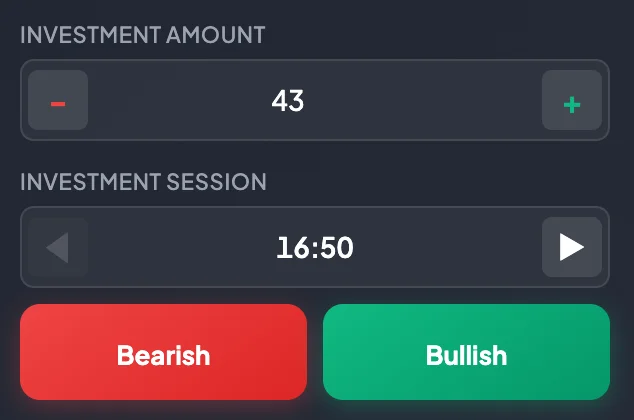
A direct investment contains four main details: Market Pair, Investment Amount, Investment Session, and direction.
- The Market Pair is selected from Markets or from the current Invest route.
- The Investment Amount is the amount of USDT you want to invest.
- The Investment Session is shown in
HH:mm UTC. - The direction is Bullish or Bearish.
What does Bullish mean?
Section titled “What does Bullish mean?”Select Bullish when you expect the session result to move upward. The Bullish button is normally green and uses an upward arrow.
When you hover over Bullish, the chart may display a green upward background effect to help confirm the direction you are about to select.
What does Bearish mean?
Section titled “What does Bearish mean?”Select Bearish when you expect the session result to move downward. The Bearish button is normally red and uses a downward arrow.
When you hover over Bearish, the chart may display a red downward background effect.
Profit Rate
Section titled “Profit Rate”The panel displays the Profit Rate for the selected Market Pair and your Current Level. The rate may differ between pairs and account levels.
Before placement, check:
- The current Market Pair.
- The displayed Profit Rate.
- Your Current Level.
- Whether Demo mode or Real mode is active.
A higher Profit Rate does not mean lower risk. It is the rate used to calculate a profitable result under the platform rules.
Entering the Investment Amount
Section titled “Entering the Investment Amount”You can set the Investment Amount in several ways:
- Enter the USDT amount manually.
- Select
-or+to decrease or increase it. - Select a quick amount such as $5, $10, $20, $50, $100, $200, $500, or $1000.
New users should begin with a small amount to reduce the risk of losing control of their funds.
Selecting the Investment Session
Section titled “Selecting the Investment Session”The Investment Session is displayed in HH:mm. Use the arrow buttons to move between sessions.
Before placement, confirm that:
- The selected session is correct.
- The session is still open for investment.
- You did not accidentally select a distant future session.
- You understand when that session will close.
Placement steps
Section titled “Placement steps”- Open the Invest page for the desired Market Pair.
- Check the active mode in the navbar.
- Check the Account Balance.
- Enter the Investment Amount in USDT.
- Select the Investment Session.
- Review the chart and Order Book if needed.
- Check the Profit Rate.
- Select Bullish or Bearish.
- Open Trade History to confirm that the investment was recorded.
- Wait for the Finish line and review the result popup.
What happens after selecting Bullish or Bearish?
Section titled “What happens after selecting Bullish or Bearish?”The system records the investment at the current price, with the selected Investment Amount, Investment Session, and direction. The investment may appear in Trade History, and the chart may draw an order tag.
One button selection may create one investment. Do not select the same button repeatedly when you intend to create only one investment.
Common errors
Section titled “Common errors”| Error | What to do |
|---|---|
| Insufficient balance | Reduce the Investment Amount or deposit additional USDT. |
| The session is already closed for investment | Select the next session. |
| Wrong direction selected | Check history and do not immediately place another investment to recover the loss. |
| Too many investments placed | Open Trade History and review the total Investment Amount. |
| Real mode was active instead of Demo mode | Stop placing investments and verify the navbar. |