
Browse Investment Campaigns
The Investment Campaigns page displays Entrusted Investment campaigns available on BrokerIG. Here, you can browse campaigns, review important metrics, open Campaign Details, and join a campaign when participation is available.
Unlike Direct Investment, you do not select a Market Pair and place each investment yourself. You select a campaign managed by a Consultant and allocate capital under that campaign’s conditions.
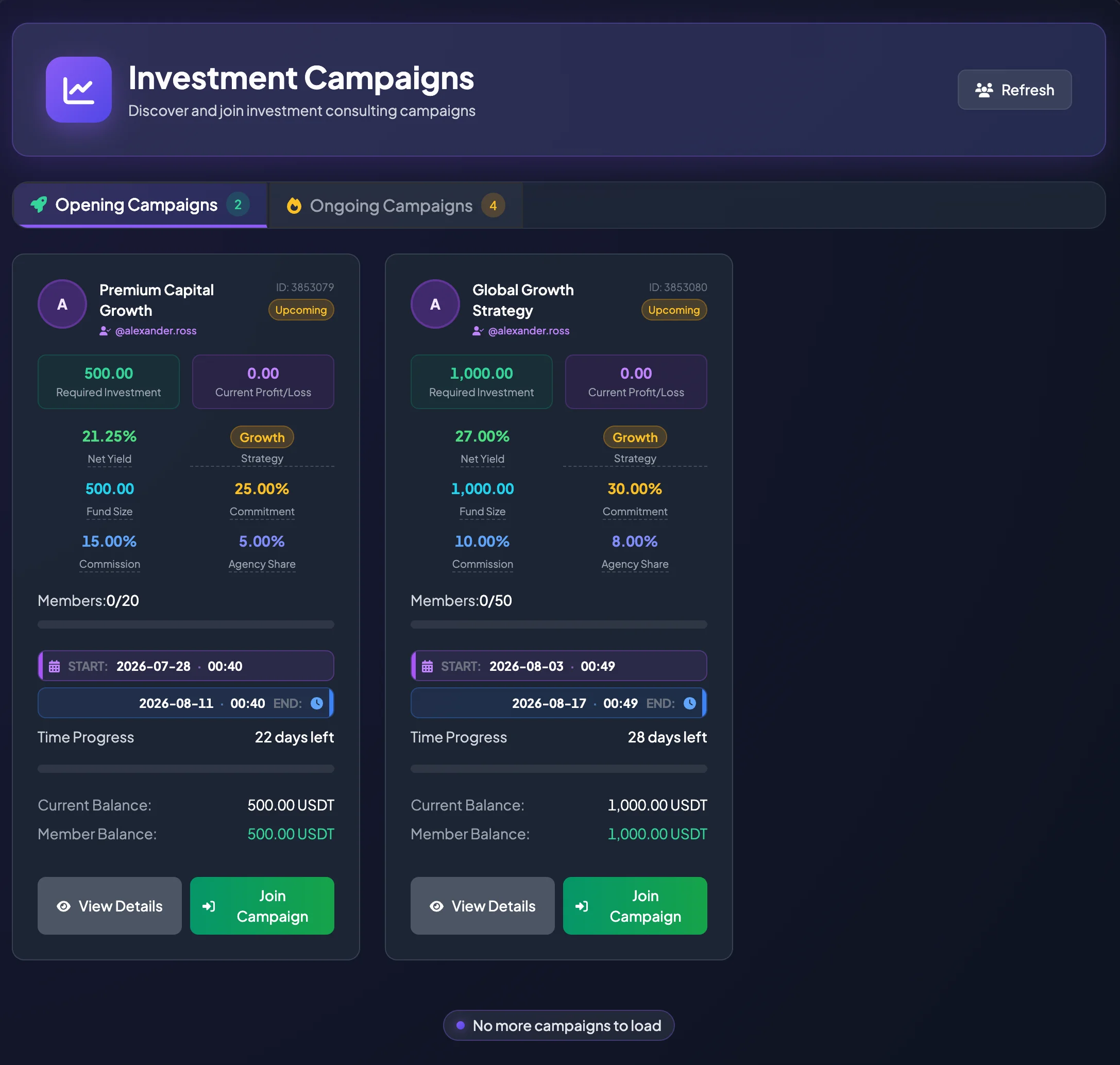
Campaign tabs
Section titled “Campaign tabs”Campaigns are grouped by status to make them easier to browse.
Opening Campaigns
Section titled “Opening Campaigns”Opening Campaigns are accepting new members. Start with this group when your goal is to find a new campaign to join.
An Opening Campaign may display Join Campaign when your account meets the participation requirements.
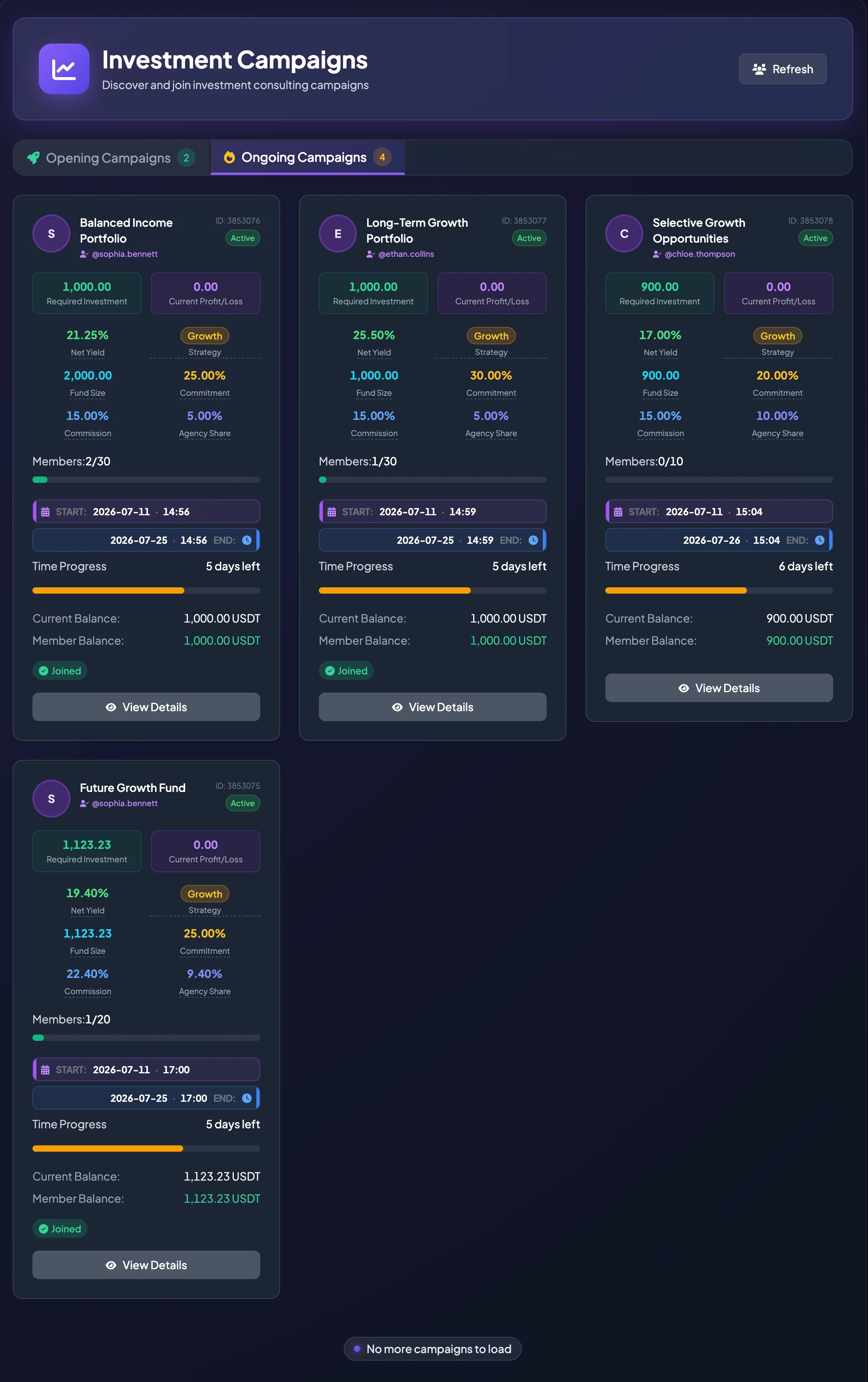
Ongoing Campaigns
Section titled “Ongoing Campaigns”Ongoing Campaigns have already started. You may still review their information, but joining may no longer be available after the opening period ends.
This group is useful when you want to observe campaigns currently in operation, review Current Profit/Loss, or follow the Consultant managing the campaign.
How to read a campaign card
Section titled “How to read a campaign card”Each campaign is displayed as a card so that you can review the main information before opening the full details.
Campaign name and Consultant
Section titled “Campaign name and Consultant”The top of the card displays the Campaign Name and the Consultant’s username. Select the Consultant username to open the Consultant Profile and review historical activity before deciding whether to join.
If the Campaign Name is truncated, select View Details to read the full information.
Campaign ID
Section titled “Campaign ID”The ID uniquely identifies the campaign. Provide it to Customer Support when you need help so the team can investigate the correct campaign.
Campaign status
Section titled “Campaign status”The status indicates the campaign stage:
- Opening: accepting members.
- Upcoming: scheduled but not yet started.
- Ongoing: currently running.
- Full: Member Capacity has been reached.
- Completed or Closed: the campaign has ended or is no longer active.
Required Investment
Section titled “Required Investment”Required Investment is the amount of capital needed to join the campaign. If your Available Balance is lower than the Required Investment, deposit additional USDT before attempting to join.
Example: if Required Investment is 1,000 USDT, your account must have enough Available Balance under the current platform rules.
Current Profit/Loss
Section titled “Current Profit/Loss”Current Profit/Loss is the campaign’s temporary or recorded result at the time you view it. This value may change throughout the campaign.
For a campaign that has not started, it may be zero.
Net Yield
Section titled “Net Yield”Net Yield is the projected member return after the Consultant Commission is deducted according to the campaign formula.
Typical formula:
Net Yield = Commitment Rate × (1 − Commission Rate)
Example:
Commitment Rate: 25%
Commission Rate: 15%
Net Yield = 25% × (1 − 15%) = 21.25%
Note: This is a projection based on campaign information. Actual results depend on investment performance.
Strategy
Section titled “Strategy”Strategy indicates the campaign’s general return and risk tier.
Common labels include:
| Strategy | General interpretation |
|---|---|
| Stable | Lower committed return and generally a more conservative approach. |
| Growth | Medium committed return with a balance between expected return and risk. |
| Aggressive | Higher committed return that may involve higher volatility and risk. |
The displayed Strategy may be derived from the Committed Return Rate. Higher expected return normally requires greater risk consideration.
Fund Size
Section titled “Fund Size”Fund Size represents the campaign capital based on Required Investment and the number of Current Members.
Simple reference formula:
Fund Size = Required Investment × Members Joined
If member data has not yet updated, the interface may display a reference value based on the available information.
A larger Fund Size may indicate strong participation, but it does not guarantee lower risk or better performance.
Commitment
Section titled “Commitment”Commitment or Committed Return Rate is the target return used for campaign projections.
Review it together with Commission, Strategy, campaign duration, and Consultant history. It should not be treated as a guaranteed result.
Commission
Section titled “Commission”Commission or Consulting Commission is the percentage of the campaign’s positive return allocated to the Consultant according to the campaign structure.
Commission directly affects Net Yield. Two campaigns with the same Commitment Rate may provide different Net Yield values when their Commission Rates differ.
Agency Share
Section titled “Agency Share”Agency Share is part of the platform’s commission-distribution mechanism. Regular participants do not normally need to calculate it to understand Net Yield, but it may be shown to explain the campaign’s commission structure.
Members
Section titled “Members”Members shows the current number of participants compared with the maximum capacity.
Example: 1/30 means one member has joined and the campaign allows up to 30 members.
When Member Capacity is reached, you may no longer be able to join.
Start and end time
Section titled “Start and end time”The card displays the campaign start and end times. Some screens use UTC, so account for timezone differences when comparing the schedule with local time.
Review the timeline carefully, especially for an Upcoming Campaign.
How to join a campaign
Section titled “How to join a campaign”- Open Entrusted Investment Market.
- Select Campaigns.
- Browse Opening Campaigns or campaigns marked as Upcoming and accepting members.
- Select a suitable campaign.
- Select View Details.
- Review Required Investment, Net Yield, Commission, timeline, Consultant, and Member Capacity.
- Select Join Campaign.
- Review the confirmation dialog.
- Select Confirm Join Campaign.
- After a successful join, track it under My Investment Campaigns.
Why is Join Campaign unavailable?
Section titled “Why is Join Campaign unavailable?”The action may be unavailable when:
- The campaign is Closed or Completed.
- The campaign is already Ongoing and no longer accepts new members.
- The campaign is not yet in an Opening status.
- You have already joined.
- Member Capacity has been reached.
- Your current account is the Consultant or campaign owner.
- Your Available Balance is insufficient.
- Account or regional eligibility requirements are not met.
How to compare campaigns
Section titled “How to compare campaigns”Review campaigns in this order:
- Required Investment: is it appropriate for your balance and risk tolerance?
- Campaign Duration: how long will the capital remain allocated?
- Net Yield: what is the projected return after Consultant Commission?
- Strategy: Stable, Growth, or Aggressive?
- Consultant: what does the Consultant Profile and Campaign History show?
- Members: are there available member slots?
- Current Profit/Loss: for an Ongoing Campaign, what is its current performance?
Notes before joining
Section titled “Notes before joining”- Do not select a campaign only because it has the highest Net Yield.
- A high Commitment Rate normally requires more careful risk review.
- Review both profitable and unprofitable historical campaigns.
- Verify Required Investment before confirming.
- After joining, monitor the campaign in My Investment Campaigns.