
Timeline, Invest Line, Finish Line, and Order Tags
The timeline shows which Investment Session is selected, how much time remains for placement, and when the result will be settled.
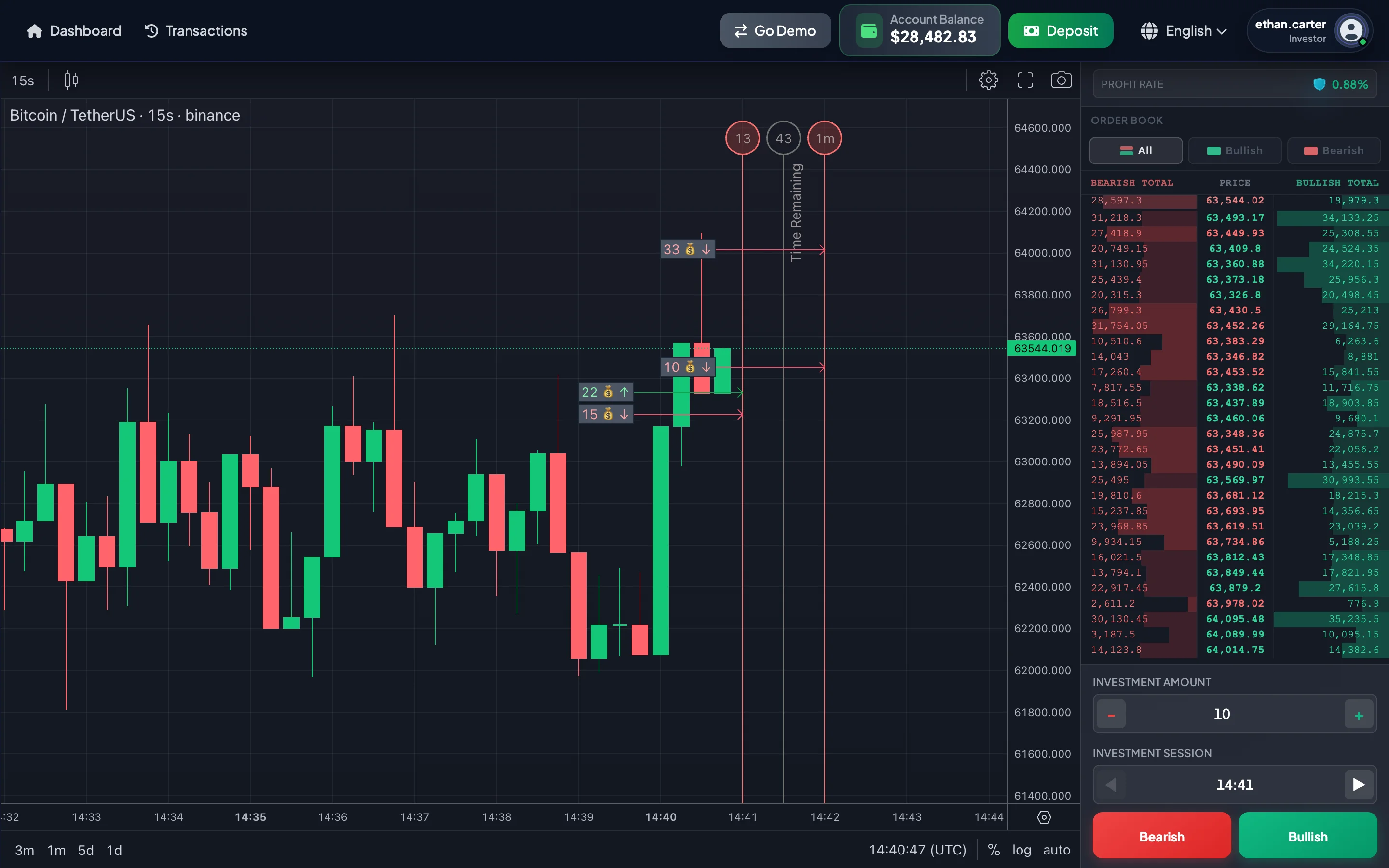
Three important components
Section titled “Three important components”| Component | Meaning |
|---|---|
| Current Session marker | The session currently selected or monitored. |
| Invest line | The placement deadline for the selected session. |
| Finish line | The session end point, when the system settles the result. |
Two countdowns
Section titled “Two countdowns”The Invest page may display two countdowns:
| Countdown | Counts down to | Meaning |
|---|---|---|
| Investment countdown | Invest line | Time remaining to place an investment in the selected session. |
| Settlement countdown | Finish line | Time remaining until the result is settled. |
When the investment countdown reaches zero, move to a new session. When the settlement countdown reaches zero, the result popup may appear.
Practical example
Section titled “Practical example”If the Current Session is 13:30 UTC:
- Invest line: 13:30:30
- Finish line: 13:31:00
If you select Bullish at 13:30:20, the investment belongs to the 13:30 session. At 13:30:31, the system may automatically move the selected session to 13:31:
- New Invest line: 13:31:30
- New Finish line: 13:32:00
Current Session marker vs. order tag
Section titled “Current Session marker vs. order tag”The Current Session marker can move when you select Previous or Next. It does not mean that an investment has been placed.
An order tag indicates that an investment was recorded in that session. If a session contains several investments, the chart may display several tags or combine them, depending on the interface.
What can an order tag show?
Section titled “What can an order tag show?”An order tag may help identify:
- The selected Investment Session.
- Bullish or Bearish direction.
- Investment Amount.
- Price at placement.
- Demo mode or Real mode, if the interface distinguishes them.
Why is the order tag near the Finish line?
Section titled “Why is the order tag near the Finish line?”Positioning the tag near the Finish line makes it easier to compare the entry with the session result. You can review how the price moved between placement and settlement.
When old session lines disappear
Section titled “When old session lines disappear”After a session ends:
- The old Invest line and Finish line may disappear.
- The result popup may appear.
- The Account Balance may update.
- The investment status is updated in history.
- The interface moves to the next session.
If the popup does not appear, open Trade History.
Common misunderstandings
Section titled “Common misunderstandings”| Misunderstanding | Correct interpretation |
|---|---|
| The Finish line is the placement deadline | The Finish line is the result-settlement point. |
| The old session is still available after second 30 | From second 30 onward, the session is closing. |
| The Current Session marker confirms an investment | Only an order tag or history confirms placement. |
| No tag means the investment disappeared | The chart may not have rendered it yet; check Trade History. |
| Sessions use the device’s local time | Sessions are displayed in UTC. |