
Markets
The Markets section is where you browse the market pairs available for direct investment on BrokerIG.
Here, you can compare market pairs, view the Profit Rate currently applied to your account, monitor recent price movement, and select the pair you want to invest in. After you select a pair, the platform opens the direct-investment screen for that market.
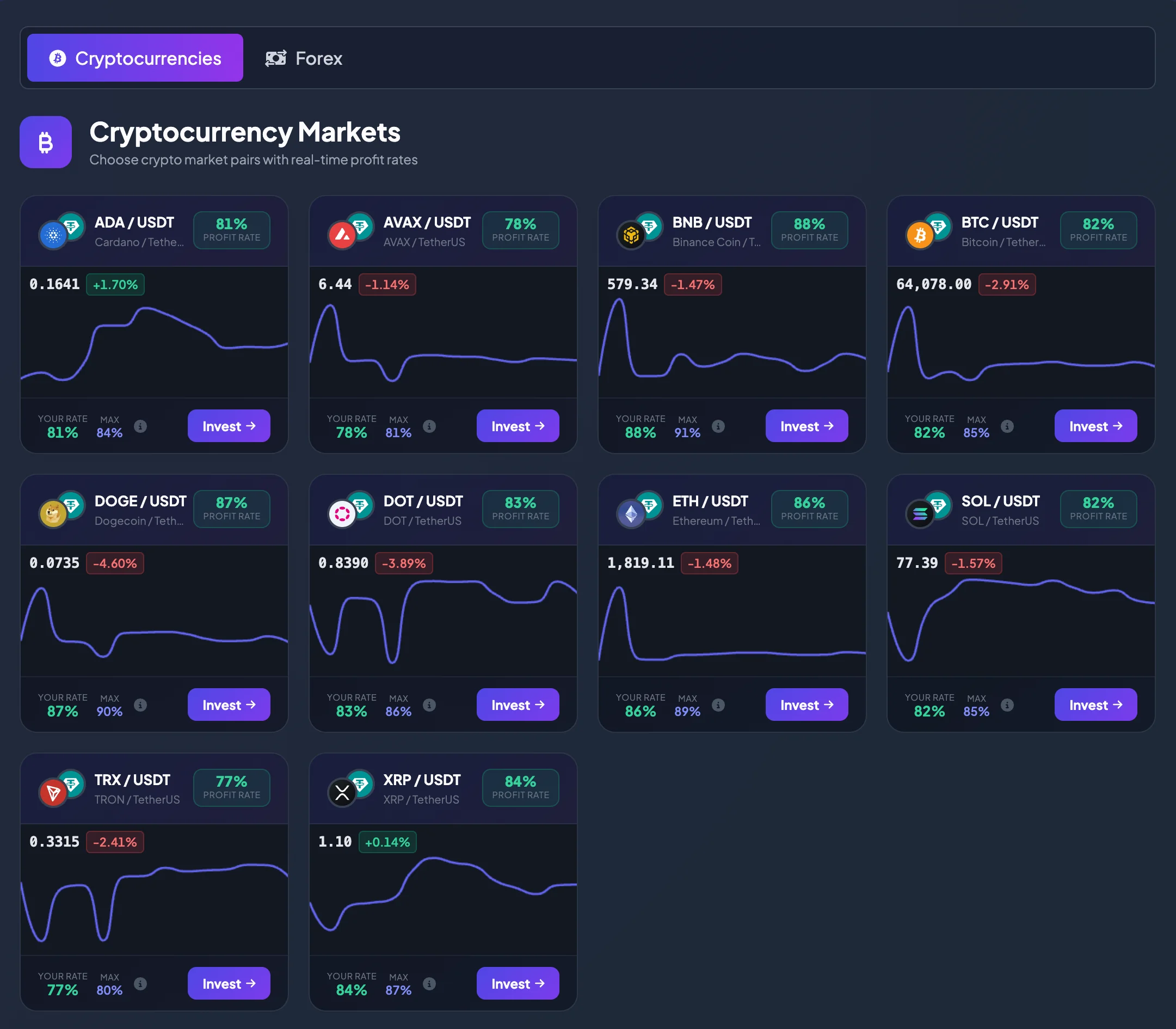
What can you do on the Markets page?
Section titled “What can you do on the Markets page?”The Markets page helps you answer several questions before investing:
- Which market pairs are currently available for investment?
- Which pairs belong to Cryptocurrencies, and which belong to Forex?
- What is the Profit Rate for each pair?
- Is the rate applied to your account lower than the Max rate?
- Has the pair recently moved up or down?
- Which pair should you open on the direct-investment screen?
You do not need to open every pair to review the basic information. Each pair is displayed on a separate market card so that you can compare several options before deciding.
Main market groups
Section titled “Main market groups”Market pairs are organized into recognizable groups.
Cryptocurrencies
Section titled “Cryptocurrencies”The Cryptocurrencies group contains crypto pairs that are commonly quoted in USDT, such as BTC/USDT, ETH/USDT, and SOL/USDT.
This group is useful when you want to follow crypto assets that may move quickly, have high market activity, and are often available continuously compared with many traditional markets.
Learn more: Cryptocurrency Markets
The Forex group contains currency pairs such as EUR/USD, GBP/USD, USD/JPY, and AUD/USD.
This group is useful when you want to invest based on the exchange-rate movement between two currencies. Each pair represents the value of the first currency relative to the second.
Learn more: Forex Markets
How to read a market card
Section titled “How to read a market card”Each market pair card normally includes the following information.
Market pair
Section titled “Market pair”The pair name identifies the assets being compared. For example:
- BTC / USDT: Bitcoin quoted in USDT.
- ETH / USDT: Ethereum quoted in USDT.
- EUR / USD: Euro quoted in U.S. dollars.
- USD / JPY: U.S. dollar quoted in Japanese yen.
In direct investment, you are not buying or selling the underlying asset for long-term ownership. You select a pair, analyze its price movement, and place an investment under the conditions shown by the platform.
Profit Rate
Section titled “Profit Rate”The Profit Rate is the rate used to calculate the result when an investment is profitable under the product conditions.
For example, if a pair displays a Profit Rate of 88%, a profitable investment is calculated using 88% of the Investment Amount, before any other applicable product conditions.
Note: The Profit Rate does not guarantee that every investment will be profitable. It only determines how the result is calculated when an investment succeeds.
Your rate
Section titled “Your rate”Your rate is the Profit Rate currently applied to your account.
It may depend on:
- The selected Market Pair.
- Your Current Level.
- Your Account Balance.
- The product configuration at the time you view the market.
A higher account level may provide a better rate on some market pairs.
Max is the highest Profit Rate currently available for that pair.
If Your rate is lower than Max, your account may not yet meet the level required to receive the pair’s maximum rate.
Learn more: Account Levels and Profit Rates
Current price and recent movement
Section titled “Current price and recent movement”Each market card may display the current price and a small chart showing recent movement.
Use this information to quickly review:
- The current price.
- Whether the pair has recently moved up or down.
- Whether the price is moving steadily or fluctuating sharply.
- Whether the pair is worth opening on the full investment screen for further analysis.
The small chart is only a quick preview. It does not replace the detailed price chart on the direct-investment screen.
How to choose a pair for direct investment
Section titled “How to choose a pair for direct investment”Follow these steps:
- Open Markets.
- Select the market group you want to view, such as Cryptocurrencies or Forex.
- Review the available Market Pairs.
- Compare Profit Rate, Your rate, Max, and recent price movement.
- Select the pair you want to analyze more closely.
- Select Invest to open the direct-investment screen.
On the direct-investment screen, you continue by selecting the Investment Amount, Investment Session, market direction, and other required information before submitting the investment.
When should you open the investment screen?
Section titled “When should you open the investment screen?”Consider opening a pair when:
- You understand what the pair represents.
- You have reviewed its recent movement.
- Its Profit Rate fits the level of risk you are prepared to take.
- You have enough Available Balance.
- You want to inspect the detailed chart before making a decision.
Do not select Invest only because a pair has the highest Profit Rate. A higher rate may be attractive, but it does not remove market risk.
How Markets, balance, and account level are connected
Section titled “How Markets, balance, and account level are connected”Your account level is determined by your USDT Account Balance. When the balance reaches a higher threshold, the account may be upgraded to the corresponding level.
A higher account level may provide a better Profit Rate on some market pairs.
To review or increase your level, check your balance on Dashboard or My Wallet, then deposit additional USDT if appropriate.
Learn more:
Notes before selecting a pair
Section titled “Notes before selecting a pair”- Profit Rates may differ between market pairs.
- The same pair may provide different rates for different account levels.
- Market prices can move quickly, especially for cryptocurrencies.
- The small card chart is only a quick reference.
- Direct investment always involves the risk of losing the Investment Amount when the prediction is incorrect.
- Start with a small amount if you are not yet familiar with how the product works.
Frequently asked questions
Section titled “Frequently asked questions”Why does each pair have a different Profit Rate?
Section titled “Why does each pair have a different Profit Rate?”Each market pair has different liquidity, volatility, and product settings. Therefore, the Profit Rate may differ from one pair to another.
Why is Your rate lower than Max?
Section titled “Why is Your rate lower than Max?”This usually means that your account has not yet reached the highest level applicable to that pair. Check your Current Level and the balance required for the Next Level.
Do I need to choose the pair with the highest Profit Rate?
Section titled “Do I need to choose the pair with the highest Profit Rate?”Not necessarily. Profit Rate is important, but you should also consider recent movement, how well you understand the pair, and the amount you are prepared to risk.
Does selecting Invest place an investment immediately?
Section titled “Does selecting Invest place an investment immediately?”No. Invest opens the direct-investment screen. The investment is created only after you enter the required information and submit it.