
Campaign Details
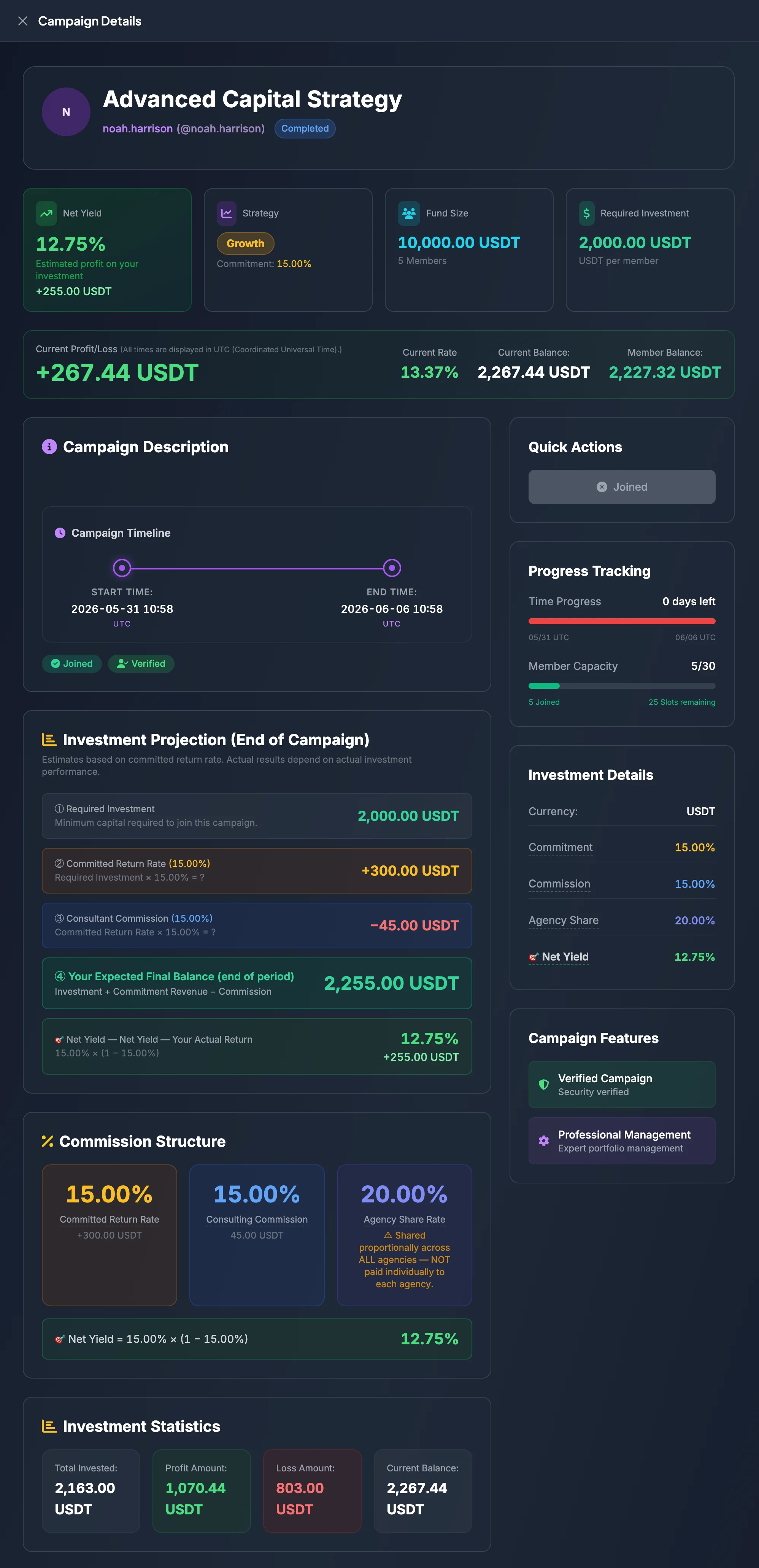
The Campaign Details page provides more information than a campaign card. Open this page before joining any Entrusted Investment campaign.
It includes the campaign overview, Consultant information, return metrics, Required Investment, start and end times, Campaign Description, and the Investment Projection at the end of the campaign.
Open Campaign Details
Section titled “Open Campaign Details”- Open Entrusted Investment Market.
- Select Campaigns.
- Find the campaign you want to review.
- Select View Details.
You can also open Campaign Details from My Investment Campaigns after joining.
Campaign header
Section titled “Campaign header”The top of the page normally displays:
- Campaign Name.
- Campaign ID.
- Consultant name or username.
- Campaign status.
- Key metrics such as Net Yield, Strategy, Fund Size, and Required Investment.
Use the Campaign ID when contacting Customer Support, because several campaigns may have similar names.
Read Net Yield
Section titled “Read Net Yield”Net Yield is one of the most important metrics for a campaign participant. It represents the projected return after Consultant Commission is deducted according to the campaign formula.
Reference formula:
Net Yield = Commitment Rate × (1 − Commission Rate)
Example:
Committed Return Rate: 25%
Consulting Commission: 15%
Net Yield = 25% × (1 − 15%) = 21.25%
If Required Investment is 1,000 USDT, the projected profit based on a 21.25% Net Yield is 212.50 USDT.
Note: This is a projection based on the campaign configuration. It is not a guarantee that you will receive the exact amount.
Read Strategy
Section titled “Read Strategy”Strategy describes the campaign’s general expected-return and risk tier.
A reference interpretation:
- Stable: lower Commitment Rate and a generally more conservative approach.
- Growth: medium Commitment Rate.
- Aggressive: higher Commitment Rate and potentially higher risk.
New users should begin with a campaign whose Required Investment and Strategy are easy to understand before considering a campaign with high expected return.
Read Fund Size
Section titled “Read Fund Size”Fund Size indicates the current total campaign capital.
Typical calculation:
Fund Size = Required Investment × Current Members
Fund Size helps you estimate the level of community participation. However, a larger Fund Size does not guarantee lower risk or higher return.
Read Required Investment
Section titled “Read Required Investment”Required Investment is the capital needed to join. Review it before selecting Join Campaign.
Confirm that:
- Your wallet has enough Available Balance.
- You understand that the capital will be allocated to the campaign.
- The campaign duration fits your plan for using those funds.
If the balance is insufficient, deposit additional USDT before joining.
Read Current Profit/Loss
Section titled “Read Current Profit/Loss”Current Profit/Loss is the temporary campaign result at the time you view it.
- A positive value means the campaign currently has a gain.
- A negative value means the campaign currently has a loss.
- Zero may appear before the campaign begins or before performance is recorded.
For an Opening Campaign that has not started, Current Profit/Loss is not normally the primary factor in the join decision.
Read Campaign Description
Section titled “Read Campaign Description”The Campaign Description explains the Consultant’s objectives, strategy, or operational notes.
Review it to understand:
- The intended investment style.
- Any timeline, risk, or operational notes.
- Whether the description is clear and credible.
If the description is vague, review the Consultant Profile and Campaign History before deciding.
Read the Campaign Timeline
Section titled “Read the Campaign Timeline”The Campaign Timeline normally includes:
- Start Time.
- End Time.
- Display timezone, often UTC.
Review these times because your capital may remain allocated throughout the campaign period.
Investment Projection at the end of the campaign
Section titled “Investment Projection at the end of the campaign”The Investment Projection (End of Campaign) estimates the result if the campaign achieves the Committed Return Rate.
The projection normally includes:
- Required Investment: the capital you allocate.
- Commitment Revenue: Required Investment multiplied by Commitment Rate.
- Consultant Commission: the fee calculated from Commitment Revenue.
- Your Expected Final Balance: Required Investment plus Commitment Revenue minus Consultant Commission.
Reference formulas:
Commitment Revenue = Required Investment × Commitment Rate
Consultant Commission = Commitment Revenue × Commission Rate
Your Expected Final Balance = Required Investment + Commitment Revenue − Consultant Commission
Example:
Required Investment: 1,000 USDT
Commitment Rate: 25%
Commission Rate: 15%
Commitment Revenue = 1,000 × 25% = 250 USDT
Consultant Commission = 250 × 15% = 37.50 USDT
Expected Final Balance = 1,212.50 USDT
The page may display a note such as:
Estimates are based on the Committed Return Rate. Actual results depend on actual investment performance.
Join from Campaign Details
Section titled “Join from Campaign Details”If the campaign is eligible, select Join Campaign from the detail page.
Before confirming, review:
- Campaign Name.
- Campaign ID.
- Consultant.
- Required Investment.
- Start and End Time.
- Net Yield.
- Consulting Commission.
- Available Balance.
After joining, the campaign appears under My Investment Campaigns.
When should you be more cautious?
Section titled “When should you be more cautious?”Review a campaign more carefully when:
- Net Yield is significantly higher than other campaigns.
- Consulting Commission is high but Consultant history is limited.
- Campaign Description is short or does not explain the strategy.
- Required Investment exceeds the capital you are comfortable risking.
- Campaign Duration is too long for your expected use of the funds.