
Direct Investment on the Invest Page
The Invest page is the main workspace for making direct investments on BrokerIG. Unlike the Markets page, where you browse Market Pairs and choose a pair to follow, the Invest page is where you select an Investment Amount, choose an Investment Session, choose Bullish or Bearish, and review the result after the session closes.
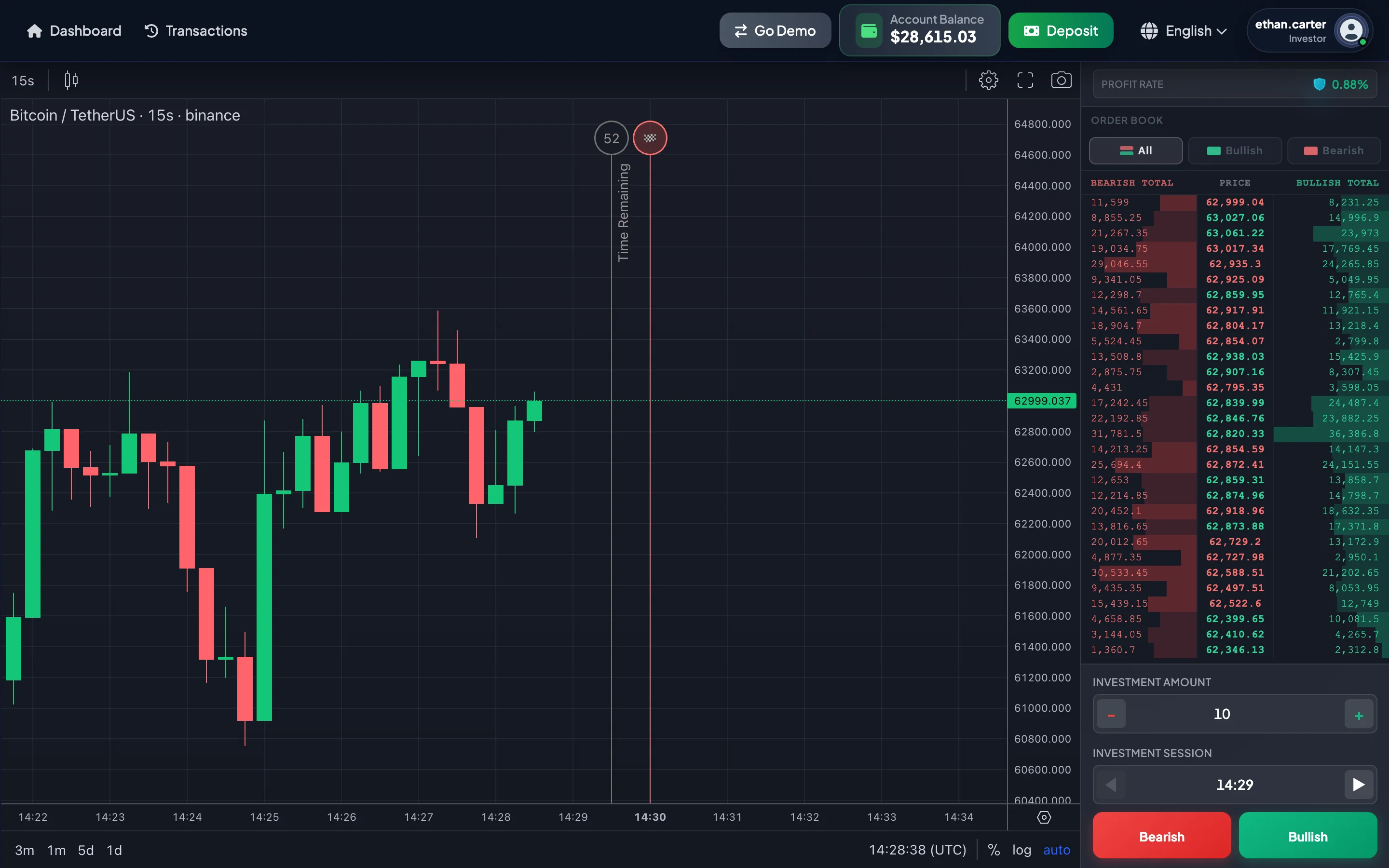
What is the Invest page used for?
Section titled “What is the Invest page used for?”Use the Invest page to:
- Monitor the real-time price chart for the selected Market Pair.
- View the current Account Balance in the navbar.
- Switch between Demo mode and Real mode with
Go DemoandGo Live. - Select an Investment Amount in USDT.
- Select an Investment Session in
HH:mm UTC. - Choose Bullish when you expect the session result to move upward.
- Choose Bearish when you expect the session result to move downward.
- Review the Order Book for recent Bullish and Bearish capital flow.
- Open Trade History without leaving the Invest page.
- View the result popup when the session closes.
Quick overview of an investment session
Section titled “Quick overview of an investment session”Each session lasts one minute. The Current Session is the current minute in UTC.
Example: session 13:42 UTC.
| Time | Meaning |
|---|---|
| 13:42:00 → 13:42:30 | You can place investments for the 13:42 session. |
| 13:42:30 → 13:43:00 | The session is closing. Do not assume that you can still place an investment for 13:42. |
| 13:43:00 | The 13:42 session ends and the system reports the result. |
After the clock passes second 30, the selected session may automatically move to the next session. For example, at 13:30:31, the newly selected session may be 13:31, with a new Invest line at 13:31:30 and a Finish line at 13:32:00.
Main areas of the page
Section titled “Main areas of the page”| Area | Purpose |
|---|---|
| Navbar | Displays the Account Balance, switches modes with Go Demo / Go Live, and opens Trade History. |
| Investment panel | Sets the Investment Amount, selects the Investment Session, displays the Profit Rate, and provides Bullish/Bearish buttons. |
| Price chart | Displays price movement, candles, trend, timeline, and order tags. |
| Timeline | Displays the Invest line and Finish line for a session. |
| Order Book | Displays recent Bullish and Bearish amounts by price and session. |
| Result popup | Displays the result after the session closes. |
Direct Investment vs. Entrusted Investment
Section titled “Direct Investment vs. Entrusted Investment”| Type | Who makes the decisions? | Duration | Where do you track it? |
|---|---|---|---|
| Direct Investment | You choose the Market Pair, Investment Amount, Investment Session, and direction. | Short sessions, such as one minute. | Invest page and Direct Investment History. |
| Entrusted Investment | You select a campaign created by a Consultant. | The full campaign duration. | Campaign pages and My Campaigns. |
The Invest page is only for Direct Investment.
Recommended reading order for new users
Section titled “Recommended reading order for new users”- Invest Page Layout
- Demo Mode and Real Mode
- One-Minute Sessions and Session Selection
- How to Place Bullish or Bearish Investments
- How to Read the Price Chart
- Timeline, Invest Line, Finish Line, and Order Tags
- How to Read the Order Book
- Quick History and Result Popup
- Strategy and Risk Management
- Invest Page FAQ
Important warning
Section titled “Important warning”One-minute direct investment moves quickly and involves the risk of losing the Investment Amount. The price chart, Order Book, Profit Rate, and Bullish/Bearish capital flow are analytical references only and do not guarantee a result. Before using Real mode, practice in Demo mode and invest only an amount you are prepared to risk.