
Consultant Profile
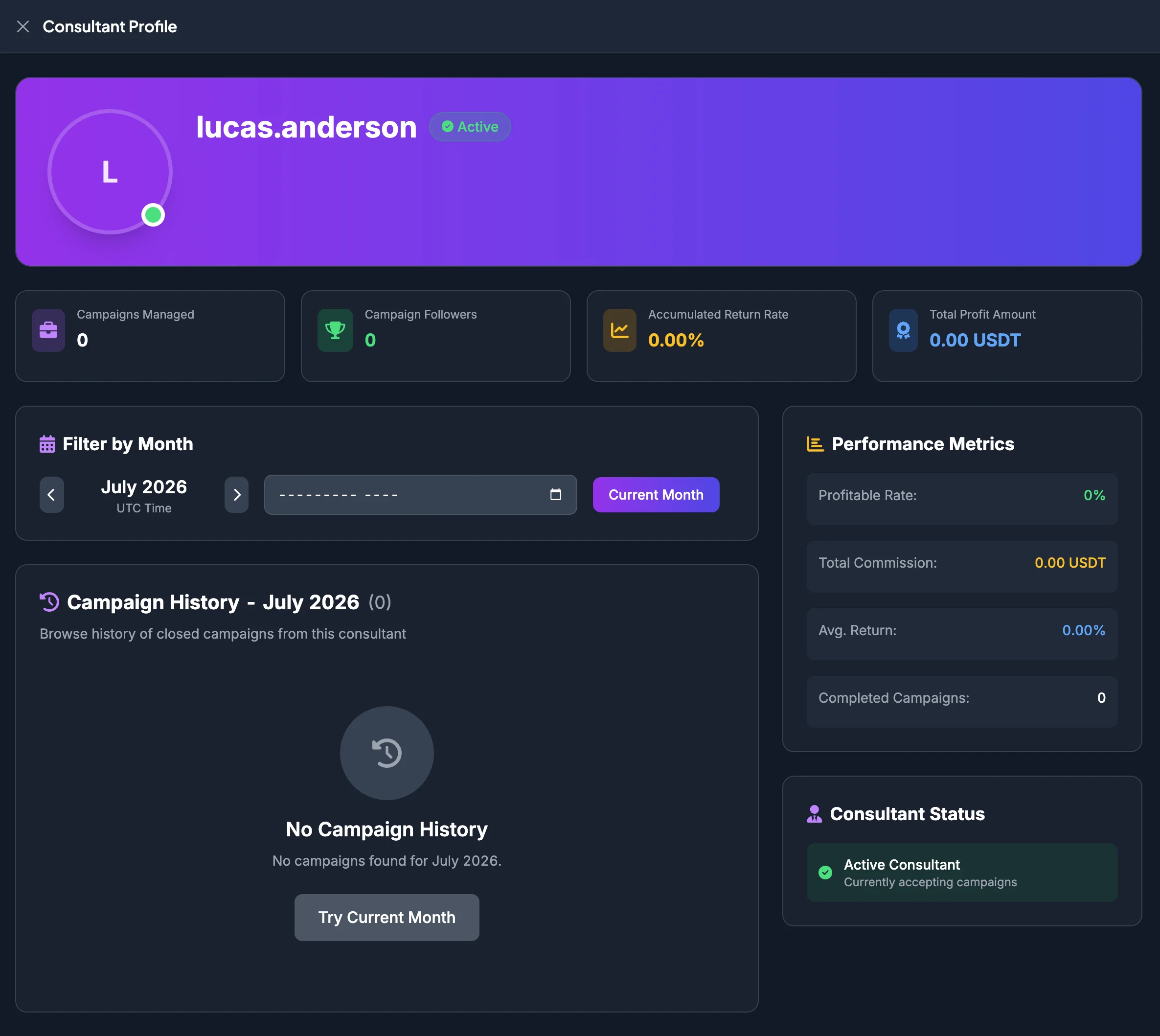
The Consultant Profile helps you evaluate a Consultant before joining an Entrusted Investment campaign. It includes overview metrics, Campaign History, and performance indicators for comparison.
Open a Consultant Profile
Section titled “Open a Consultant Profile”You can open the profile from:
- The Consultants page by selecting View Profile.
- A campaign card by selecting the Consultant username.
- Campaign Details when a Consultant link is available.
Profile header
Section titled “Profile header”The top section normally displays:
- Consultant username or name.
- Consultant Status.
- Consultant Rating, when available.
- Campaigns Managed.
- Campaign Followers.
- Accumulated Return Rate.
- Total Profit Amount.
These metrics provide an initial overview, but should not be used independently to make a decision.
Meaning of the primary metrics
Section titled “Meaning of the primary metrics”Campaigns Managed
Section titled “Campaigns Managed”Campaigns Managed is the number of campaigns the Consultant has managed or is currently managing.
A larger number provides more historical data for evaluation, but does not automatically mean higher quality.
Campaign Followers
Section titled “Campaign Followers”Campaign Followers indicates user interest in the Consultant or the Consultant’s campaigns.
It is a popularity indicator, not a profitability metric.
Accumulated Return Rate
Section titled “Accumulated Return Rate”Accumulated Return Rate represents the Consultant’s combined return according to system data.
When this number is high, also review:
- How many campaigns were completed.
- Whether any campaigns had large losses.
- Whether returns came from one exceptional campaign or remained consistent across several campaigns.
Total Profit Amount
Section titled “Total Profit Amount”Total Profit Amount is the total profit recorded from the Consultant’s campaigns.
Compare it with capital used and Campaigns Managed. A large total profit does not necessarily represent strong efficiency when the total capital managed was also very large.
Filter Campaign History by month
Section titled “Filter Campaign History by month”The profile may allow Campaign History to be filtered by month. Times may be displayed in UTC.
- Select the month filter.
- Wait for the history list to refresh.
- Review campaigns completed during that month.
- Open Campaign Details for campaigns requiring further review.
Read Consultant Campaign History
Section titled “Read Consultant Campaign History”The history normally lists Closed or Completed Campaigns. Each row or card may include:
| Information | Meaning |
|---|---|
| Campaign ID | Identifier used for reconciliation or Customer Support. |
| Campaign Name | The campaign managed by the Consultant. |
| Members | Members joined compared with Member Capacity. |
| Investment Amount | Required Investment or campaign capital. |
| Current Profit/Loss | The campaign’s recorded result. For a completed campaign, use it to evaluate performance. |
| Avg. Return | The campaign’s average return rate. |
| Timeline | Campaign start and end period. |
| View Details | Opens the complete Campaign Details. |
Performance indicators
Section titled “Performance indicators”Profitable Rate
Section titled “Profitable Rate”Profitable Rate is the percentage of campaigns with a positive result among the campaigns included in the metric.
For example, a 30% Profitable Rate means approximately 30% of the measured campaigns produced a positive result.
Total Commission
Section titled “Total Commission”Total Commission is the Consultant Commission recorded by the system. It indicates the scale of Consultant activity, but does not directly represent participant profit.
Avg. Return
Section titled “Avg. Return”Avg. Return is the average return rate of the campaigns included in the calculation.
Review individual campaigns to determine whether the average is distorted by one unusually profitable or unprofitable campaign.
Completed Campaigns
Section titled “Completed Campaigns”Completed Campaigns is the number of campaigns that have ended and are recorded in the profile.
A Consultant with more Completed Campaigns provides more historical data for evaluation.
Consultant-evaluation checklist
Section titled “Consultant-evaluation checklist”- Is the Consultant active?
- Is there enough Campaign History to evaluate?
- Is the Profitable Rate stable?
- Are there large losses that require attention?
- Does Avg. Return come from several campaigns or only a small number of exceptional results?
- Is the Required Investment of the new campaign appropriate for you?
- Does the campaign Strategy fit your risk tolerance?
- The Consultant Profile is reference information intended to support your own decision.
- An active Consultant does not mean that every campaign is suitable.
- Past performance does not guarantee future results.
- Review the Consultant Profile together with the complete Campaign Details.