
Forex Markets
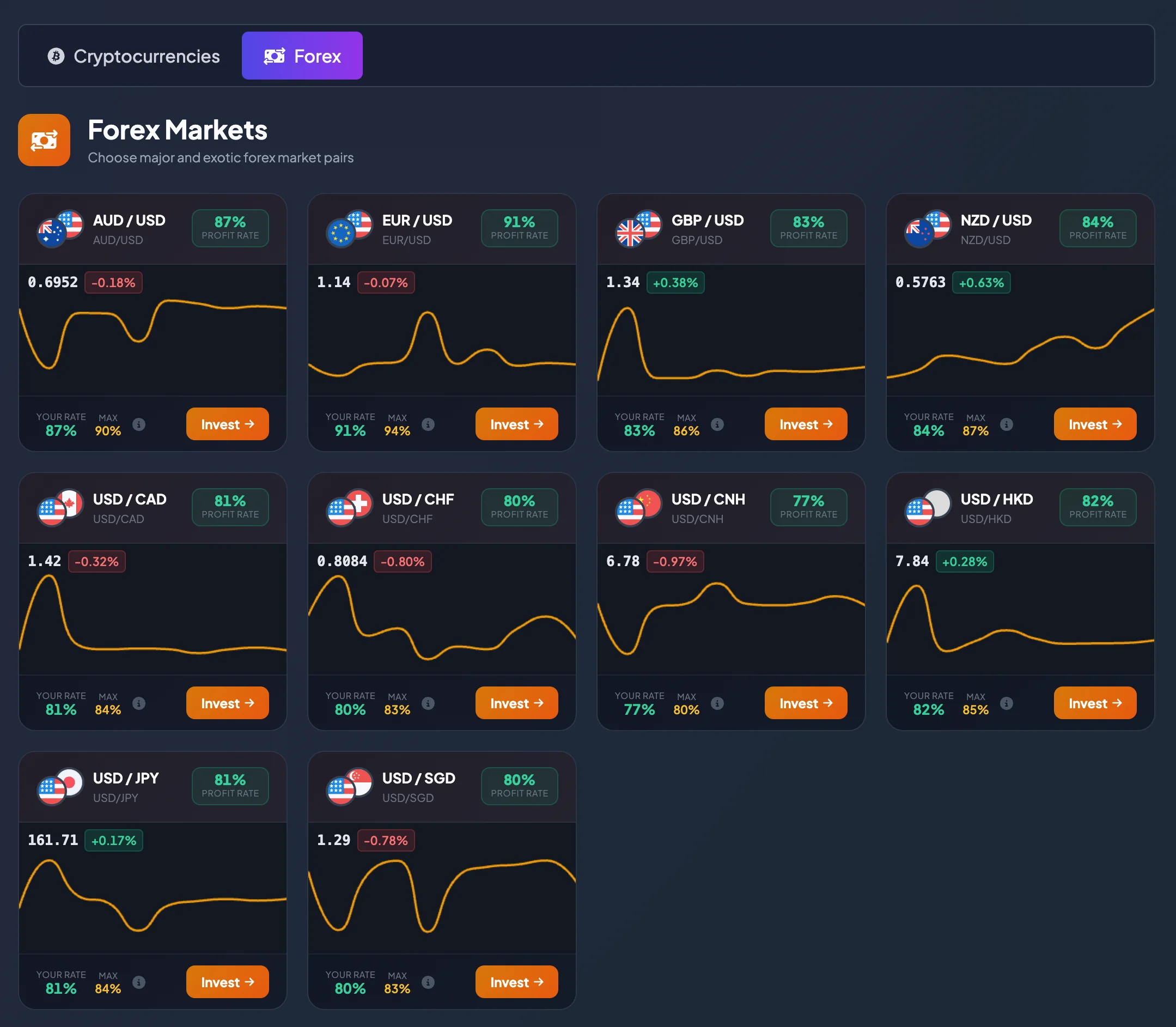
The Forex Markets page displays currency pairs available for direct investment on BrokerIG.
Each Forex pair represents the exchange rate between two currencies. For example, EUR/USD shows the value of the euro relative to the U.S. dollar. When you select a Forex pair for direct investment, you are making a prediction about the direction of that pair under the investment conditions shown by the platform.
When should you use this page?
Section titled “When should you use this page?”Open Forex Markets when you want to:
- View currency pairs currently available for investment.
- Compare Profit Rates across multiple Forex pairs.
- Review recent price movement before opening the investment screen.
- Find a pair with a rate suitable for your Current Level.
- Open the direct-investment screen for a currency pair.
Common Forex pairs
Section titled “Common Forex pairs”The actual list may change according to product configuration. The current interface may include pairs such as:
| Pair | Meaning |
|---|---|
| AUD / USD | Australian dollar relative to the U.S. dollar |
| EUR / USD | Euro relative to the U.S. dollar |
| GBP / USD | British pound relative to the U.S. dollar |
| NZD / USD | New Zealand dollar relative to the U.S. dollar |
| USD / CAD | U.S. dollar relative to the Canadian dollar |
| USD / CHF | U.S. dollar relative to the Swiss franc |
| USD / CNH | U.S. dollar relative to the offshore Chinese yuan |
| USD / HKD | U.S. dollar relative to the Hong Kong dollar |
| USD / JPY | U.S. dollar relative to the Japanese yen |
| USD / SGD | U.S. dollar relative to the Singapore dollar |
Note: Available pairs may change based on market hours, liquidity, product configuration, or other platform conditions.
How to read a Forex pair
Section titled “How to read a Forex pair”A Forex pair contains two currencies.
For EUR / USD:
- EUR is the base currency.
- USD is the quote currency.
- The price indicates how many U.S. dollars equal one euro.
If EUR/USD rises, the euro is generally strengthening relative to the U.S. dollar, or the U.S. dollar is weakening relative to the euro. If the price falls, the opposite may be happening.
For USD / JPY:
- USD is the base currency.
- JPY is the quote currency.
- The price indicates how many Japanese yen equal one U.S. dollar.
Understanding the direction of the pair helps you read the chart and select the intended Bullish or Bearish direction more accurately.
How to read a Forex market card
Section titled “How to read a Forex market card”Each card normally includes the following information.
Pair name and description
Section titled “Pair name and description”The pair name identifies the currencies being compared. Check the pair carefully before selecting Invest, because many Forex pairs have similar symbols.
Examples:
- USD / CAD
- USD / CHF
- USD / CNH
- USD / HKD
- USD / JPY
- USD / SGD
Pairs that begin with USD can react differently to the same U.S.-dollar news. Do not assume they will move in the same way simply because USD is the base currency.
Profit Rate
Section titled “Profit Rate”The Profit Rate is the rate used to calculate the result when the investment is profitable.
Different Forex pairs may have different Profit Rates. For example, one pair may display 81% while another displays 91%. Review this value before opening the direct-investment screen.
Your rate
Section titled “Your rate”Your rate is the Profit Rate currently applied to your account.
A higher account level may provide a higher rate on some pairs. If Your rate is lower than Max, review the account-level page to see the balance required for the Next Level.
Max is the highest Profit Rate currently available for the pair.
This lets you see whether your account is already receiving the best available rate for that pair.
Price and recent movement
Section titled “Price and recent movement”The current price and small chart help you quickly review how the pair has moved recently.
Use this area to:
- Check whether the pair is moving up or down.
- Assess whether recent movement is strong or limited.
- Identify pairs worth opening on the detailed price chart.
- Avoid choosing a pair with very limited movement when your approach requires a clearer direction.
How to select a Forex pair
Section titled “How to select a Forex pair”- Open Markets.
- Select Forex.
- Review the available currency pairs.
- Prioritize pairs that you understand or follow regularly.
- Compare Profit Rate, Your rate, and Max.
- Review the current price and recent movement.
- Select Invest on the pair you want to open.
After selecting Invest, BrokerIG opens the direct-investment screen for that pair. Review all information again before submitting an investment.
Suggestions for comparing Forex pairs
Section titled “Suggestions for comparing Forex pairs”When several pairs are available, compare them in this order:
-
Which pair do you understand best?
Prioritize pairs that you follow regularly or understand at a basic level. -
Which Profit Rate is suitable?
A higher rate may be attractive, but it does not mean lower risk. -
Is the price moving clearly?
If the pair remains in a narrow range for a long time, predicting a direction may be more difficult. -
Is movement unusually strong?
During sharp volatility, consider reducing the Investment Amount or waiting. -
Do you have enough balance?
Check My Wallet before placing an investment.
Forex risk notes
Section titled “Forex risk notes”Forex prices may move because of interest rates, economic data, political events, liquidity, and investor sentiment.
Remember:
- Prices may move very quickly.
- A pair with a high Profit Rate can still produce an unprofitable result.
- Do not use your entire balance for one investment.
- Start with a small amount if you are new to the product.
- Do not make a decision based only on the small chart shown on the market card.
Frequently asked questions
Section titled “Frequently asked questions”Which Forex pair is suitable for a beginner?
Section titled “Which Forex pair is suitable for a beginner?”Beginners often start with widely followed pairs such as EUR/USD or GBP/USD. However, the appropriate choice still depends on your knowledge, strategy, and risk tolerance.
Why do Forex pairs have different Profit Rates?
Section titled “Why do Forex pairs have different Profit Rates?”Each pair has its own product configuration. The Profit Rate may depend on volatility, liquidity, platform settings, and your account level.
How can I receive a higher Profit Rate?
Section titled “How can I receive a higher Profit Rate?”Review your Current Level. If your balance has not reached the Next Level threshold, you may deposit additional USDT when appropriate.
Learn more: Account Levels and Profit Rates
Does the Invest button create an investment immediately?
Section titled “Does the Invest button create an investment immediately?”No. Invest opens the direct-investment screen for the selected pair. The investment is created only after you enter the required information and submit it.