
Cryptocurrency Markets
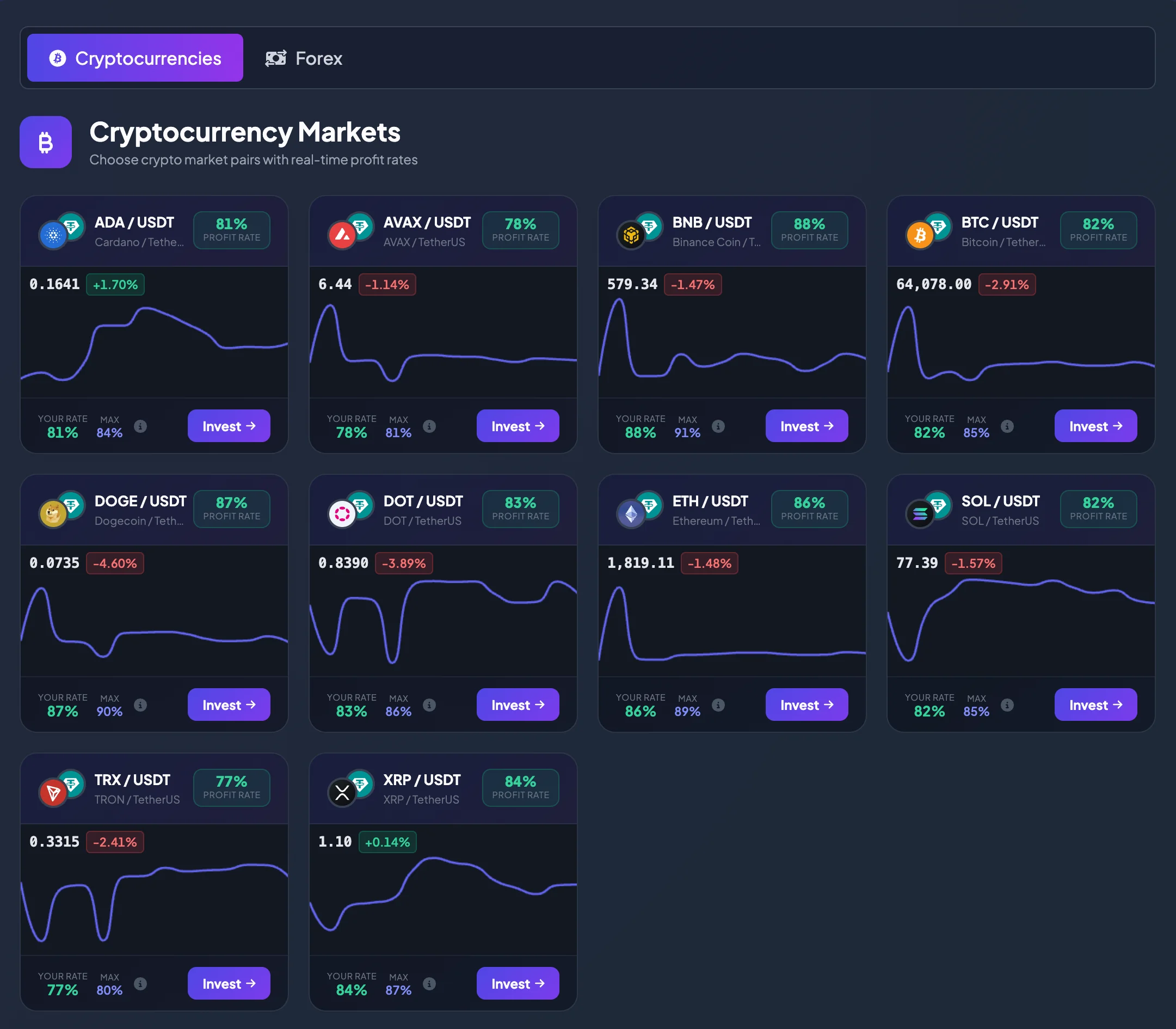
The Cryptocurrency Markets page displays crypto pairs available for direct investment on BrokerIG.
Pairs in this group are commonly quoted in USDT, such as BTC/USDT, ETH/USDT, and SOL/USDT. When you select a crypto pair, you can review its Profit Rate, current price, recent movement, and then open the direct-investment screen.
When should you use this page?
Section titled “When should you use this page?”Use Cryptocurrency Markets when you want to:
- View crypto pairs currently available for investment.
- Compare Profit Rates across several crypto assets.
- Check the current price and recent movement.
- Find a pair with a rate suitable for your Current Level.
- Open the direct-investment screen for a selected pair.
Cryptocurrencies often move faster than many traditional assets. In addition to the Profit Rate, review price direction and volatility before investing.
Common crypto pairs
Section titled “Common crypto pairs”The actual list may change according to product configuration. The current interface may include pairs such as:
| Pair | Description |
|---|---|
| ADA / USDT | Cardano / TetherUS |
| AVAX / USDT | AVAX / TetherUS |
| BNB / USDT | Binance Coin / TetherUS |
| BTC / USDT | Bitcoin / TetherUS |
| DOGE / USDT | Dogecoin / TetherUS |
| DOT / USDT | DOT / TetherUS |
| ETH / USDT | Ethereum / TetherUS |
| SOL / USDT | SOL / TetherUS |
| TRX / USDT | TRON / TetherUS |
| XRP / USDT | XRP / TetherUS |
Note: Available pairs, prices, and Profit Rates may change. Always review the current information immediately before submitting an investment.
How to read a crypto pair
Section titled “How to read a crypto pair”For BTC / USDT:
- BTC is the crypto asset being tracked.
- USDT is the quote asset.
- The price shows how many USDT equal one BTC.
For ETH / USDT, the price shows how many USDT equal one ETH.
When the price rises, the crypto asset listed first is gaining value relative to USDT. When the price falls, it is losing value relative to USDT.
How to read a crypto market card
Section titled “How to read a crypto market card”Each crypto card normally includes the following information.
Pair and asset name
Section titled “Pair and asset name”The pair name identifies the asset you are following.
Examples:
- BTC / USDT — Bitcoin / TetherUS.
- ETH / USDT — Ethereum / TetherUS.
- BNB / USDT — Binance Coin / TetherUS.
- SOL / USDT — SOL / TetherUS.
Check the pair carefully before selecting Invest, especially because many crypto pairs use USDT as the quote asset.
Profit Rate
Section titled “Profit Rate”The Profit Rate is the rate used to calculate the result when an investment is profitable.
Different crypto pairs may display different Profit Rates. Some pairs may show rates around 80–90% or higher depending on current product configuration. Review the rate together with price movement rather than using it as the only selection criterion.
Your rate
Section titled “Your rate”Your rate is the Profit Rate currently applied to your Current Level.
If your account has not reached a higher level, Your rate may be lower than the Max rate for that pair.
Max is the highest Profit Rate currently available for the pair.
If Your rate is below Max, review your account level and the required balance threshold.
Learn more: Account Levels and Profit Rates
Current price and recent change
Section titled “Current price and recent change”The crypto card may display the current price and recent percentage change. A negative change indicates that the price moved down over the displayed period; a positive change indicates that it moved up.
Use this information as a quick filter for pairs with clearer movement.
How to select a crypto pair
Section titled “How to select a crypto pair”- Open Markets.
- Select Cryptocurrencies.
- Review the available Market Pairs.
- Select a pair you want to follow, such as BTC/USDT or ETH/USDT.
- Compare Profit Rate, Your rate, and Max.
- Review the current price and recent movement.
- Select Invest to open the direct-investment screen for that pair.
On the investment screen, review the pair, Investment Amount, Investment Session, and other conditions before submitting the investment.
Suggestions for comparing crypto pairs
Section titled “Suggestions for comparing crypto pairs”Familiarity
Section titled “Familiarity”If you are new, prioritize assets you already know or follow regularly, such as BTC/USDT or ETH/USDT.
Price volatility
Section titled “Price volatility”Crypto prices may move quickly over short periods. Strong movement may create opportunities, but it also increases risk.
Profit Rate
Section titled “Profit Rate”A higher Profit Rate may be attractive, but it does not guarantee a better outcome. A lower-rate pair that you understand well may fit your approach better.
Balance and account level
Section titled “Balance and account level”A higher account level may provide a better rate on some pairs. Check your USDT balance and Current Level when comparing markets.
Crypto risk notes
Section titled “Crypto risk notes”Before investing in crypto pairs, remember:
- Crypto prices may change very quickly.
- Short-term volatility may be stronger than in Forex.
- Do not invest only because a pair has a high Profit Rate.
- Do not use your entire balance for one pair.
- Start with a small amount if you are new to direct investment.
- Review all information before submitting an investment.
Frequently asked questions
Section titled “Frequently asked questions”Why do crypto pairs use USDT?
Section titled “Why do crypto pairs use USDT?”USDT is commonly used as the quote asset for crypto pairs. This makes it easier to compare the value of several crypto assets in the same unit.
Which pair has the best Profit Rate?
Section titled “Which pair has the best Profit Rate?”Profit Rates may change by pair, Current Level, and platform configuration. Review the Markets page at the time you intend to invest.
Are cryptocurrencies suitable for beginners?
Section titled “Are cryptocurrencies suitable for beginners?”They may be suitable if you start with a small amount and understand the volatility risk. If you are new, review the chart and practice in Demo mode before using Real mode.
Does selecting Invest confirm the investment immediately?
Section titled “Does selecting Invest confirm the investment immediately?”No. Invest only opens the direct-investment screen. You still need to enter the required information and submit the investment.